
NHS North West Genomics
0.1.0 - ci-build

NHS North West Genomics
0.1.0 - ci-build
NHS North West Genomics, published by NHS North West Genomics. This guide is not an authorized publication; it is the continuous build for version 0.1.0 built by the FHIR (HL7® FHIR® Standard) CI Build. This version is based on the current content of https://github.com/nw-gmsa/nw-gmsa.github.com/ and changes regularly. See the Directory of published versions
This guide is to support Genomic Testing Workflow at a regional level and is designed to be compatible with:
The general workflow is based on IHE LTW profiles and HL7 v2 OML and ORU.
Genomic Testing Workflow is part of Diagnostic Testing, which is also part of the general clinical process.
graph TD;

    A[Assessment]-->|Creates Observations| B;
    A--> |Needs Diagnostic Testing and Completes| T;
    B[Diagnosis]-->|Creates Condition| C;
    T[<b>Order Placer</b><br/>Genomics Test Order]--> |"Sends Laboratory Order<br/>LAB-1 FHIR Message O21"| AN;
    T --> |Asks for| S
    S[Specimen Collection] --> |Sends Specimen| AN;
    AN["<b>Order Filler</b><br/>Diagnostic Testing"] --> |"Requests further tests <br/>(reflex order)"| T;
    AN --> |Sends Laboratory Report<br/>LAB-3 HL7 v2 ORU_R01| A;
    C[Plan]-->|Creates Goals and Tasks| D;
    D[Implement/Interventions]-->|Actions Tasks| E;
    E[Evaluate]--> |Reviews Care| A;

    click T Questionnaire-GenomicTestOrder.html
    click AN Questionnaire-GenomicTestReport.html
    click S ExampleScenario-BiopsyProcedure.html

    classDef purple fill:#E1D5E7;

    classDef yellow fill:#FFF2CC;
    classDef pink fill:#F8CECC
    classDef green fill:#D5E8D4;
    classDef blue fill:#DAE8FC;
    classDef orange fill:#FFE6CC;

    class A pink
    class B yellow
    class C green
    class D blue
    class E orange

    class O,S,T,AN purple
Genomic diagnostic testing follows the same standardized process defined by the IHE Laboratory Testing Workflow used in traditional laboratory testing. This workflow has been enhanced to support the sharing of laboratory reports (documents) through Integrated Care Systems (ICS). In addition, a new mechanism for sharing laboratory reports has been introduced to establish a regional genomic data repository.
graph TD;

    subgraph NHSTrust[NHS Trust]
        T[<b>Order Placer</b><br/>EPR]--> |"1a. Sends Laboratory Order<br>LAB-1 HL7v2 ORM_O01/OML_O21"| TIE;
        TIE[Trust Integration Engine]
        TIE--> |4c. Sends Laboratory Report<br/>LAB-3 HL7 v2 ORU_R01| T;
    end
    TIE --> |"1b. Sends Laboratory Order<br>LAB-1 FHIR Message O21"| RIE;
    T --> |2. Asks for| S
    S[Specimen Collection] --> |3. Sends Specimen| AN;
    subgraph NWGenomics[North West Genomics]
        RIE --> |"1c. Sends Laboratory Order<br>LAB-1 HL7 v2 OML_O21"| AN;
        AN["<b>Order Filler</b><br/>Diagnostic Testing<br/>LIMS iGene"] --> |4a. Sends Laboratory Report<br/>LAB-3 HL7 v2 ORU_R01| RIE;
        RIE[Regional Integration Engine] --> |4b. Sends Laboratory Report<br/>LAB-3 HL7 v2 ORU_R01| TIE;
    end
    click T Questionnaire-GenomicTestOrder.html
    click AN Questionnaire-GenomicTestReport.html
    click S ExampleScenario-BiopsyProcedure.html

    classDef purple fill:#E1D5E7;

    classDef yellow fill:#FFF2CC;
    classDef pink fill:#F8CECC
    classDef green fill:#D5E8D4;
    classDef blue fill:#DAE8FC;
    classDef orange fill:#FFE6CC;

    class A pink
    class B yellow
    class C green
    class D blue
    class E orange

    class O,S,T,AN purple
The chimerism testing pathway within the NHS is used to monitor the success of a haematopoietic stem cell transplant (HSCT) and involves a specific process of sample collection, transport, and analysis guided by clinical consensus guidelines. The testing is requested by a patient's clinical team, not directly by the patient.
 graph TD;
    subgraph NHSTrust[NHS Trust]
        Practitioner[Consultant Haematologist<br/>Practitioner] --> |1. Creates Order| EPR[<b>Order Placer</b><br/>EPR]
        Practitioner --> |3. Asks For| Specimen[Sample Collection]
        TIE[Trust Integration Engine]
    end
    EPR --> |"2a. Sends Laboratory Order<br/>M118.1 Short Tandem Repeat (STR)<br/>HL7 v2 ORM_O01 (MFT)"| TIE
    Specimen --> |4. Send Specimen| LIMS
    TIE --> |"2b. Sends Laboratory Order<br/>HL7 v2 ORM_O01"| RIE
    subgraph NWGenomics[North West Genomics]
        RIE --> |"2b. Sends Laboratory Order<br/>HL7 v2 ORM_O01"| LIMS
        LIMS[<b>Order Filler</b><br/>LIMS Histotrac]
        LIMS --> |5a. Send Laboratory Report<br/>HL7 v2 ORU_R01| RIE["Regional Integration Engine"]
    end
    RIE --> |5b. Send Laboratory Report<br/>HL7 v2 ORU_R01| TIE
    TIE --> |5c. Send Laboratory Report<br/>HL7 v2 ORU_R01| EPR

    classDef purple fill:#E1D5E7;

    class EPR,LIMS,Specimen,Practitioner purple
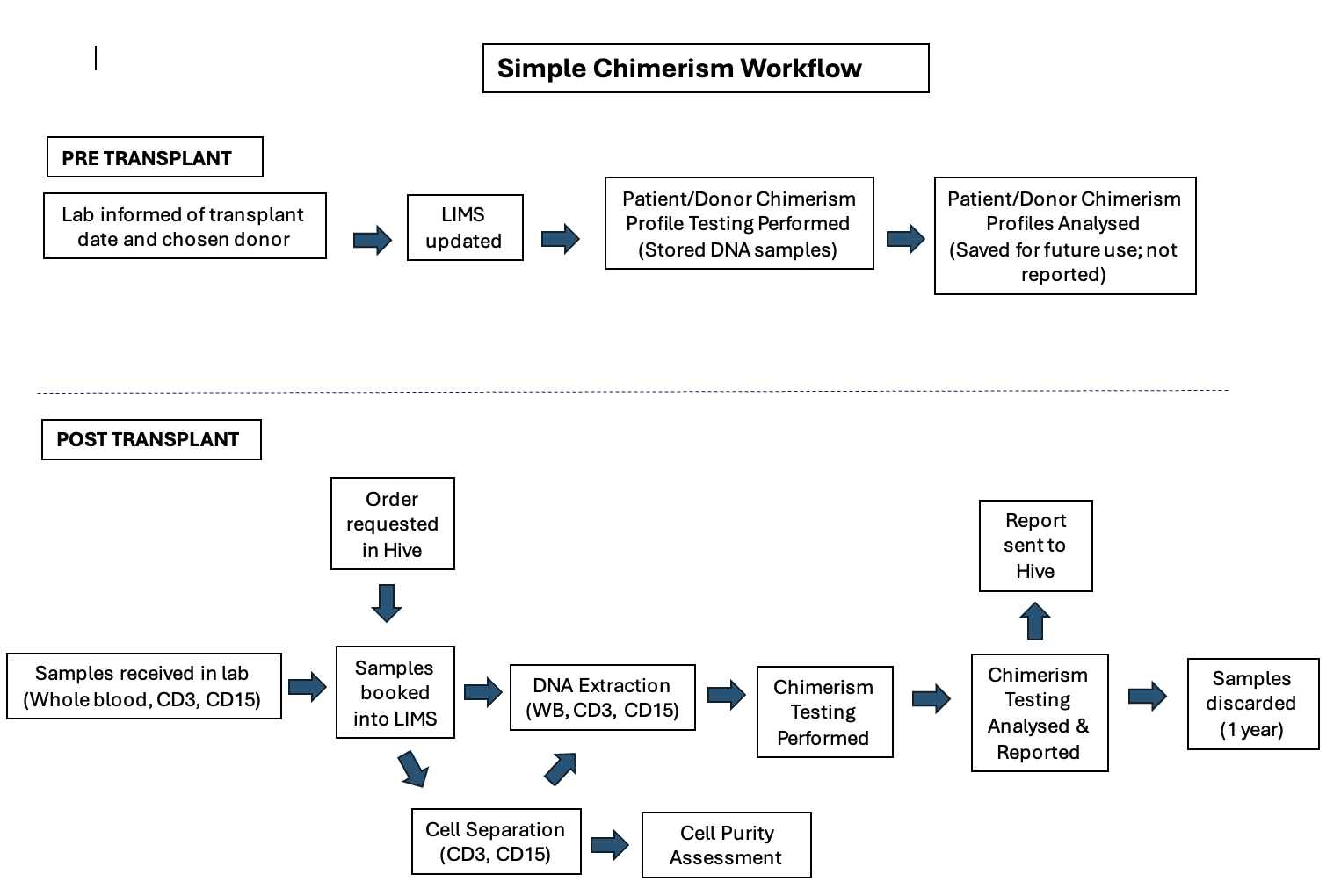
Chimerism Genomic Tests - MFT
Future
graph TD

    subgraph Trust[NHS Trust]
        EPR[<b>Order Placer</b><br/>EPR]
        TIE[Trust Integration Engine]
    end
    EPR --> |"1. Create Laboratory Order<br/>Manual entry"| HODS
    HODS --> |"2. Send Laboratory Order + Specimen<br/>"| MFTReception[Specimen Reception]
    MFTReception --> |"3a. (Manual) Immunology Laboratory Order + Specimen"| LIMS["<b>Order Filler</b><br/>Immunology LIMS"]

    subgraph Laboratory["Laboratory - MFT"]

        LIMS --> |3b. Send Laboratory Report<br/>HL7 v2 ORU_R01| LIE[Laboratory<br/>Trust Integration Engine]

    end
    LIE --> |3c. Send Laboratory Report<br/>HL7 v2 ORU_R01| RIE
    RIE --> |3d and 4d. Send Laboratory Report<br/>HL7 v2 ORU_R01| HODS
    MFTReception --> |"4a. Genomics Laboratory Order + Specimen<br/>Manual"| TestType
    subgraph NWGenomics[North West Genomics]
        RIE["Regional Integration Engine"]
        HODS["<b>Order Filler</b><br/>HODS<br/><b>Order Placer</b>"]
        TestType[Test Distribution<br/>By Test Type] --> |4b. Tests A, B, C, etc| GLHS
        TestType --> |4b. Tests D, E etc| GLHI
        GLHS["<b>Order Filler</b><br/>LIMS Shire"]
        GLHS --> |4c. Send Laboratory Report<br/>HL7 v2 ORU_R01| RIE
        GLHI["<b>Order Filler</b><br/>LIMS iGene)"]
        GLHI --> |4c. Send Laboratory Report<br/>| RIE

    end
    HODS --> |5. Write Consolidated Report| HODS
    HODS --> |"6a. Send Consolidated Laboratory Report<br/>Email"| RIE

    RIE --> |6b Send Laboratory Report| TIE
    TIE --> |Laboratory Report| EPR

    classDef purple fill:#E1D5E7;

    class NHSTrust,HODS,GLHS,GLHI,LIMS purple
For information purposes only. This is a more detailed breakdown of the Genomic Tests.
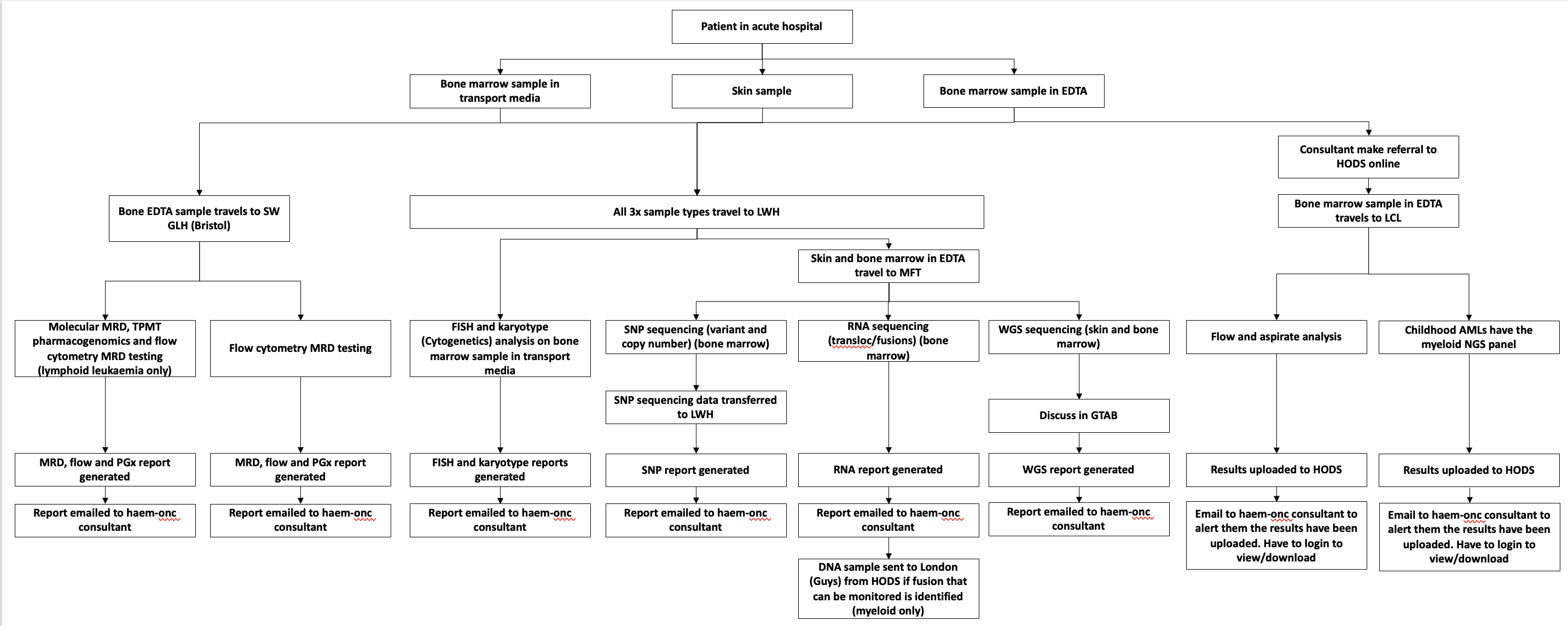
HODS Genomic Tests - Mersey and Cheshire GLH
TBD - Starlims
graph TD;
    subgraph NHSTrustA[Cheshire and Mersey NHS Trust]
        EPRA[<b>Order Placer</b>] --> |2. Asks For| SpecimenA[Sample Collection]
        TIEA["Trust Integration Engine"]

        EPRA --> |1a. Laboratory Order| TIEA
    end
    subgraph NHSTrustB[Greater Manchester NHS Trust]
        EPRB[<b>Order Placer</b>] --> |2. Asks For| SpecimenB[Sample Collection]
        TIEB[Trust Integration Engine]
        EPRB --> |1a. Laboratory Order| TIEB
    end
    SpecimenA --> |3. Send Specimen| LIMSA
    SpecimenB --> |3. Send Specimen| LIMSB
    subgraph NWGenomics[NW Genomics]
    TIEA --> |1b. Laboratory Order| RIE
    TIEB --> |1b. Laboratory Order| RIE
    RIE --> |1c. Laboratory Order| LIMSA[<b>Order Filler</b><br/>Liverpool LIMS Starlims]
    RIE --> |1c. Laboratory Order| LIMSB[<b>Order Filler</b><br/>Manchester LIMS iGene]

    LIMSA <--> |3. Redistribution of Orders and Specimen by test type| LIMSB

    LIMSA --> |4a. Laboratory Report| RIE[Regional Integration Engine]
    LIMSB --> |4a. Laboratory Report| RIE
    end
    RIE --> |4b. Laboratory Report| EPRA
    RIE --> |4b. Laboratory Report| EPRB

    classDef purple fill:#E1D5E7;
    class EPRA,EPRB,SpecimenA,SpecimenB,LIMSA,LIMSB purple;
The introduction of the Regional Integration Engine (RIE) creates a single mechanism for sending orders and reports to the appropriate regional laboratories. It abstracts the differing order and reporting formats required by each LIMS, so these variations are hidden from the NHS Trusts.
Orders can be delivered to each LIMS in two ways:
While the Automated Test Order Delivery approach is technically simpler to implement, it may not support effective laboratory order and specimen management. NW Genomics will also receive reflex and subcontracted orders, particularly within Cancer Pathways. Additionally, with the upcoming NHS England Genomic Order Management System (GOMS), reflex and subcontracted orders are expected to increase from other NHS Genomics organisations.
graph TD;
    subgraph NHSTrustA[NHS Trust]
        EPRA[<b>Order Placer</b>] --> |Asks For| SpecimenA[Sample Collection]
        EPRA --> |1a. Laboratory Order| TIE[Trust Integration Engine]
    end

    SpecimenA --> |2 Send Specimen| LIMSA
    SpecimenA --> |2 Send Specimen| LIMSB
    SpecimenA --> |2 Send Specimen| LIMSC
    SpecimenA --> |2 Send Specimen| LIMSD

    TIE --> |1b. Laboratory Order| RIE
    subgraph NWGenomics[NW Genomics]
        RIE --> |1c. Laboratory Order| TD[Test Distribution<br/>By Test Type]

        TD --> |1d. Laboratory Order| LIMSA[<b>Order Filler</b><br/>LIMS iGene]
        TD --> |1d. Laboratory Order| LIMSB[<b>Order Filler</b><br/>LIMS Starlims]
        TD --> |1d. Laboratory Order| LIMSC[<b>Order Filler</b><br/>LIMS Shire]
        TD --> |1d. Laboratory Order| LIMSD[<b>Order Filler</b><br/>LIMS Histotrac]

        LIMSA --> |4a. Laboratory Report| RIE[Regional Integration Engine]
        LIMSB --> |4a. Laboratory Report| RIE
        LIMSC --> |4a. Laboratory Report| RIE
        LIMSD --> |4a. Laboratory Report| RIE
    end
    RIE --> |4b. Laboratory Report| TIE
    TIE --> |4c. Laboratory Report| EPRA

    classDef purple fill:#E1D5E7;
    class EPRA,SpecimenA,LIMSA,LIMSB,LIMSC,LIMSD purple;
See also Inter Laboratory Workflow (ILW)
graph TD;
    subgraph NHSTrustA[NHS Trust]
        EPRA[<b>Order Placer</b>] --> |Asks For| SpecimenA[Sample Collection]
        EPRA --> |1a. Laboratory Order| TIE[Trust Integration Engine]
    end

    SpecimenA --> |2 Send Specimen| LIMSA
    SpecimenA --> |2 Send Specimen| LIMSB
    SpecimenA --> |2 Send Specimen| LIMSC
    SpecimenA --> |2 Send Specimen| LIMSD

    TIE --> |1b. Laboratory Order<br/>LAB-1| RIE
    subgraph NWGenomics[NW Genomics]
        RIE --> |1c. Laboratory Order<br/>LAB-1| LIMSA[<b>Order Filler</b><br/>LIMS iGene]

        LIMSA --> |1d. Subcontracted Laboratory Order<br/>LAB-35| LIMSB[<b>Order Filler</b><br/>LIMS Starlims]
        LIMSA --> |1d. Subcontracted Laboratory Order<br/>LAB-35| LIMSC[<b>Order Filler</b><br/>LIMS Shire]
        LIMSA --> |1d. Subcontracted Laboratory Order<br/>LAB-35| LIMSD[<b>Order Filler</b><br/>LIMS Histotrac]

        LIMSA --> |4a. Laboratory Report| RIE[Regional Integration Engine]
        LIMSB --> |4a. Laboratory Report| RIE
        LIMSC --> |4a. Laboratory Report| RIE
        LIMSD --> |4a. Laboratory Report| RIE
    end
    RIE --> |4b. Laboratory Report| TIE
    TIE --> |4c. Laboratory Report| EPRA

    classDef purple fill:#E1D5E7;
    class EPRA,SpecimenA,LIMSA,LIMSB,LIMSC,LIMSD purple;
graph TD;
    subgraph NHSTrust[NHS Trust]
        Practitioner[fas:fa-user-md Practitioner] --> |1. Selects Order Form| FormManager
        FormManager --> OrderEntry
        Practitioner --> |3. Completes| OrderEntry[Order Form]
        EPR[<b>Order Placer</b><br/>fas:fa-database Electronic Patient Record] --> |2. Pre Populates with existing data| OrderEntry
        OrderEntry --> |4. Submits Order| EPR

        Practitioner --> |6. Asks for|Sample[Sample Collection]
    end
    EPR --> |5. Sends Laboratory Order<br/>LAB-1 HL7 FHIR Message O21| DiagnosticTesting[<b>Order Filler</b><br/>fas:fa-stethoscope Diagnostic Testing]
    Sample --> DiagnosticTesting
For more details see:
graph TD;
    Sample[Sample Collection] --> EXT
    Order --> EXT
    subgraph OrderFiller[<b>Order Filler</b> North West Genomics]
        EXT[DNA Extraction] --> SEQ[DNA Sequencing]
        SEQ --> AN[Mapping & Analysis]
        AN --> INT[Interpretation]
    end
    INT --> |Send Laboratory Report<br/>LAB-3 HL7 v2 ORU_R01| Practitioner[<b>Order Placer</b><br/>EPR]
For more details see:
For illustration purposes only, see Inter Laboratory Workflow
For illustration purposes only, see Specimen Event Tracking
IG © 2024+ NHS North West Genomics. Package fhir.nwgenomics.nhs.uk#0.1.0 based on FHIR 4.0.1. Generated 2026-02-04
Links: Table of Contents |
QA Report
| New Issue | Issues
Version History |
 |
Propose a change
|
Propose a change