


Personal Health Records
1.0.0-ballot2 - STU 1 ballot

Personal Health Records
1.0.0-ballot2 - STU 1 ballot
Personal Health Records, published by HL7 International / Patient Empowerment. This guide is not an authorized publication; it is the continuous build for version 1.0.0-ballot2 built by the FHIR (HL7® FHIR® Standard) CI Build. This version is based on the current content of https://github.com/HL7/personal-health-record-format-ig/ and changes regularly. See the Directory of published versions
| Page standards status: Informative |
A complete longitudinal patient health record may feasibly span 100 years or more. This presents numerous challenges, especially considering that the earliest EHR systems were only first written in the early 1970s. Statute of limitations specify that healthcare practitioners keep pediatric records until an 18th birthday, but even an 18 year storage requirement by providers falls well short of a 76yr lifespan. Anybody over 30 years of age is therefore almost guaranteed to have some records on hardcopy paper, compact disk, USB drive, floppy drive, or other storage mediums.
As such, this implementation guide is particularly concerned with this data storage challenge that is unique to patients, and does not immediately assume availability of B2B over-the-wire data interfaces. This guide differs from guides produced by other working groups, in that it is less concerned with over-the-wire workflows, and more concerned with the notion of a patient asking for a copy of their complete medical history, and how that would work with devices… be they smartphones, consumer medical devices, compact disks (CD), digital video disks (DVD), thumbdrives, and other storage devices for bulk data; and how that would be imported into the another system.
A useful way to think of data storage is in terms of slow-motion data transfer. The earliest electronic data storage devices were cathode ray tubes, the same devices used in computer monitors for decades. As such, there isn't as much difference between the devices that store bits and the devices that display data or transmits data over the wire as many people think. If one considers the storage device as an actor on the wire that can send or receive data, storage is just like any other data transfer - but with the ability to press a pause button indefinately mid-transfer.
As such, this implementation guide recommends that implementors treat storage in much the same way as over-the-wire data transfers. We simply are defining file formats, rather than wire formats. To this extent, we recommend the following principles when exporting data from their systems:
.phr and .sphr MIME types when possible.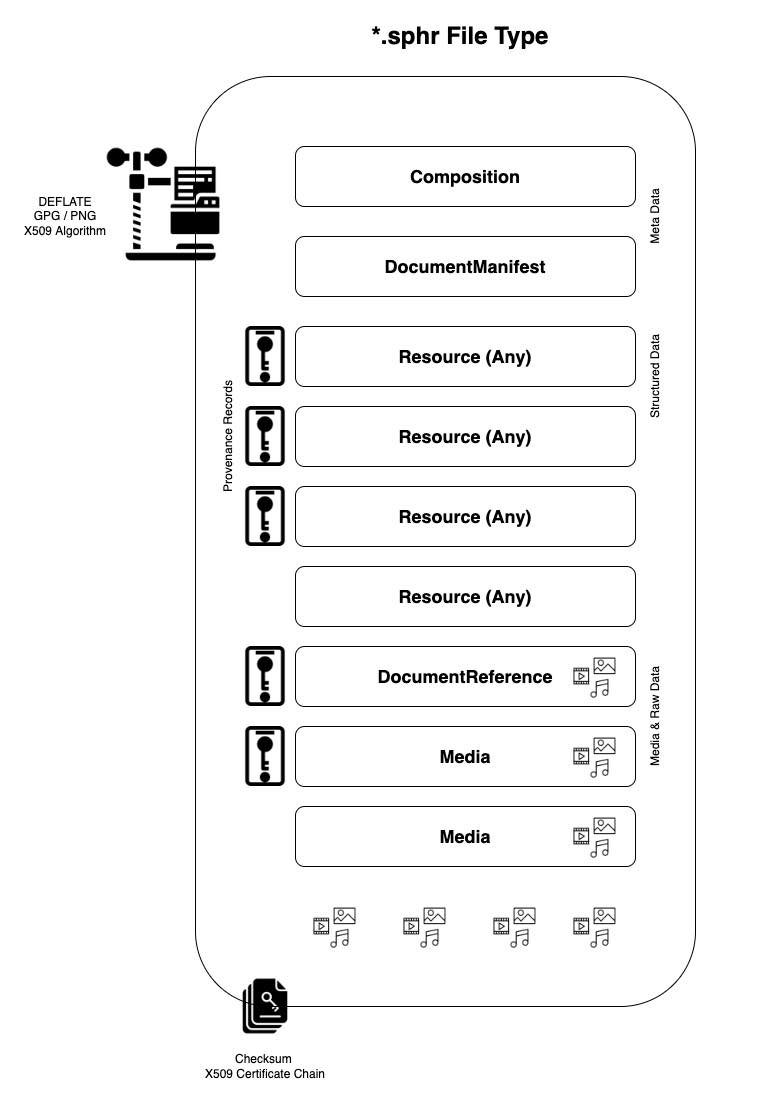
The .phr file extension is introduced in this guide, to a) specify files which contain FHIR resources, and b) to allow 3rd party applications to identify files which contain FHIR resources. Data exports containing FHIR resources SHOULD be saved with a .phr extension, using new-line deliminated JSON (NDJSON) format, similar to the Bulk Data specification.
This format is a simple, text-based format that is easy to parse and edit. It is also a good fit for streaming data, as it is easy to append to a file without having to rewrite the entire file. And perhaps most importantly, it allows multiple .phr files to be easily 'globbed' together.
A minimum viable .phr file must contain at minimum a Patient resource and a Composition resource. This example shows the smallest possible conformant .phr file in NDJSON format (each resource on its own line):
{"resourceType":"Patient","id":"minimal-patient","meta":{"lastUpdated":"2025-01-15T10:30:00Z"},"identifier":[{"system":"urn:example:phr","value":"patient-001"}],"name":[{"use":"official","family":"Tanaka","given":["Yuki"]}],"gender":"female","birthDate":"1985-03-15"}
{"resourceType":"Composition","id":"minimal-composition","meta":{"lastUpdated":"2025-01-15T10:30:00Z"},"status":"final","type":{"coding":[{"system":"http://loinc.org","code":"11503-0","display":"Medical records"}]},"subject":{"reference":"Patient/minimal-patient"},"date":"2025-01-15T10:30:00Z","author":[{"reference":"Patient/minimal-patient","display":"Yuki Tanaka"}],"title":"Personal Health Record for Yuki Tanaka","section":[{"title":"Patient Information","code":{"coding":[{"system":"http://loinc.org","code":"10154-3","display":"Chief complaint"}]},"text":{"status":"generated","div":"<div xmlns=\"http://www.w3.org/1999/xhtml\"><p>Personal Health Record created 2025-01-15</p></div>"}}]}
This minimal file can be saved as yuki-tanaka-2025-01-15.phr and serves as a starting point for implementers. From this foundation, implementers can progressively add Conditions, MedicationStatements, Observations, and other resources.
The .sphr file extension is introduced for when there are additional supporting materials, which cannot be fully expressed in FHIR format. The .sphr is a zip folder, which contains one or more FHIR resources, as well as additional supporting materials.
The .sphr file extension is intended to be used for data exports that are saved to a CD, DVD, thumbdrive, etc. Each .sphr folder should contain at least one .phr file within it, as well as additional supporting materials such as images, documents, and other media.
The .sphr container MAY contain two meta data files. One of these files is a Composition record, which acts like the 'cover page' of the bundle. This record records ownership, versioning, and various other data elements necessary for parsing the record. The second file is an International Patient Summary file, which acts as a manifest and table of contents of critical documents in the record.
Files containing patient health information MAY be zipped. The .sphr file extension is an alias for .fhir.zip or .fhir.gz. When using compression, systems SHOULD use the DEFLATE algorithm. DEFLATE is supported by both ZIP and GZIP compression utilities.
Supporting media files and raw documents may be added into the .sphr directory. Such files may include DICOM files, 3D models, images, PDFs, and other media. Each record SHOULD have a corresponding FHIR DocumentReference pointer in the .phr file.
Many patients will arrive with historical clinical documents in Consolidated Clinical Document Architecture (C-CDA) format, such as Continuity of Care Documents (CCDs), discharge summaries, and referral notes. These often exist as XML files exported from patient portals, or as scanned PDFs of printed documents. Such documents are first-class artifacts in a longitudinal health record, and SHOULD be preserved in the .sphr container rather than discarded after conversion.
The recommended process for incorporating legacy C-CDA documents into a Personal Health Record is:
.sphr container, and create a FHIR DocumentReference for each one. The original documents remain the authoritative source artifacts.The following example shows a DocumentReference pointing at a legacy CCD stored inside the .sphr container:
{
  "resourceType": "DocumentReference",
  "status": "current",
  "type": {
    "coding": [{
      "system": "http://loinc.org",
      "code": "34133-9",
      "display": "Summarization of episode note"
    }]
  },
  "subject": { "reference": "Patient/example" },
  "date": "2014-03-11T00:00:00Z",
  "description": "Continuity of Care Document from Good Health Hospital, 2014",
  "content": [{
    "attachment": {
      "contentType": "application/xml",
      "url": "documents/GoodHealthHospital-CCD-2014.xml",
      "title": "Continuity of Care Document"
    }
  }]
}
This guide intentionally does not reproduce the C-CDA metadata mappings; see C-CDA on FHIR for document-level mappings into FHIR. For the broader document paradigm — a Bundle of type = document whose first entry is a Composition — see FHIR Documents. For summary documents, see the International Patient Summary.
Claims data rounds out the financial picture of a PHR, and frequently documents encounters that never produced a clinical record the patient can access. Two FHIR-based sources cover most of the US payer landscape:
ExplanationOfBenefit, Coverage, and Patient resources.When importing claims data into a PHR:
ExplanationOfBenefit resources as received — they are the payer's record, and like clinical records they should be preserved as written.Patient resource to differ from clinical ones — member IDs rather than MRNs; see the patient-linking guidance on the Merging page.Should use NDJSON format. Please see Bulk Data Access IG for additional design guidance.
The primary difference between the Bulk Data Access format and the .phr file, is that Bulk Data exports data according to resource type. That is, all Observations get written to an Observation.ndjson file; all Condititions get written to a Conditions.ndjson file, all MedicationStatements to a MedicationStatement.ndjson file, and so forth.
Meanwhile, the .phr file is a single hetergenous .ndjson file that contains all of the data for a patient. It is a .ndjson file with mixed resource types. This is done to simplify the process of importing and exporting data. It is also done to simplify the process of querying data. It is easier to query a single file than it is to query multiple files. However, it does introduce import/export parsing requirements, that are not present in the Bulk Data Access format.
This guide does not define file-level encryption or signing for .phr and .sphr files. These files are plain NDJSON and zip archives respectively, and are not self-protecting — protection comes from the environment, not the file. Records at rest SHOULD be protected with operating-system or volume-level encryption; records in transit are protected by TLS or by SMART Health Links (which encrypt their payload and carry the key in the link itself). Authorship and integrity questions are handled with Provenance resources inside the record rather than signatures around it. See the Security page for complete guidance.
Record lifecycle management involves overseeing health records from creation through final disposition. For personal health records, lifecycle events occur across multiple systems — clinical EHRs, patient apps, devices — and must be tracked to maintain data integrity and provenance.
The PHR-S Functional Model defines a comprehensive set of Record Infrastructure (RI) lifecycle events, including:
In the FHIR context, these lifecycle events map to standard resources:
| Lifecycle Concern | FHIR Resource | Usage |
|---|---|---|
| Change tracking | Provenance | Records who changed what and when |
| Access logging | AuditEvent | Logs access, view, and disclosure events |
| Record versioning | Bundle history | Tracks resource version history |
| Attestation | Signature | Cryptographic attestation of content |
For a FHIR-based implementation of record lifecycle events, see the EHR Record Lifecycle Events IG. For the complete functional model specification, see the PHR-S Functional Model.
For conformance testing with this IG, the primary success critieria is that systems MUST have the ability to import/export the .sphr filetype. This entails storing FHIR records in a new-line delimited file (including a cover composition resource, an International Patient Summary, and provenance records as needed), and compressing the file with the DEFLATE algorithm (as needed).
The SPHR file format takes much inspiration from the DICOM DIR specification. Grossly speaking, the DICOM DIR format is like a manilla envelope. It is not a specification about the paper or documents within it, but rather, about the envelope that contains the documents of interest.
Similarly, SPHR seeks a mechanism whereby a patient's health record can be sent in structured, machine-readable formats; but which can also include copies of the raw data in various other formats. We can achieve this goal, by adopting a folder format that contains both a specified JSON or NDJSON data, along with elements in the folder that 'ride along' with the structured data. These ride along files, might be PDFs, photos of receipts, video recordings, or whatever other data that is relevant to the patient's health.
But to make that happen, we must clarify the details of the envelope that will contain such data.
Every Personal Health Record needs a patient summary — a compact, current-state view of the record that a clinician can absorb in minutes. Rather than defining a new summary format, this guide adopts the International Patient Summary (IPS) as the patient summary for PHRs: it already exists, is internationally balloted, and is widely implemented. As mentioned earlier, the .phr container MAY include an IPS document that acts as a manifest and table of contents; the IPS Composition is the recommended entry point for readers of a .sphr file.
The IPS is the "executive summary" layer of the complete PHR — the active, current information needed for immediate care decisions — while the PHR preserves the full longitudinal history beneath it. The PHR may also contain previous versions of IPS documents obtained while traveling or otherwise.
To generate (or regenerate) an IPS document from PHR data, use the most recent data (status of current or active), including:
| IPS Section | PHR Source |
|---|---|
| Medication Summary | MedicationStatement (status=active) |
| Allergies and Intolerances | AllergyIntolerance (clinicalStatus=active) |
| Problem List | Condition (clinicalStatus=active) |
| Immunizations | Immunization (status=completed, recent) |
| History of Procedures | Procedure (recent, significant) |
| Medical Devices | DeviceUseStatement (status=active) |
| Vital Signs | Observation (category=vital-signs, recent) |
When a patient receives an IPS from a healthcare provider:
IPS requires internationally recognized code systems:
| Data Type | Required Code System |
|---|---|
| Conditions | SNOMED CT (IPS subset) |
| Medications | SNOMED CT, ATC, or national drug codes |
| Allergies | SNOMED CT |
| Lab results | LOINC |
| Units | UCUM |
IG © 2022+ HL7 International / Patient Empowerment.
Package hl7.fhir.uv.phr#1.0.0-ballot2 based on FHIR 4.0.1.
Generated
2026-10-09
Links: Table of Contents |
QA Report
| Version History |
 |
Propose a change