



Regulatory Workflows and Interactions - pharma
0.1.0 - ci-build

Regulatory Workflows and Interactions - pharma
0.1.0 - ci-build
Regulatory Workflows and Interactions - pharma, published by HL7 International / Biomedical Research and Regulation. This guide is not an authorized publication; it is the continuous build for version 0.1.0 built by the FHIR (HL7® FHIR® Standard) CI Build. This version is based on the current content of https://github.com/HL7/APIX---API-Exchange-for-Medicinal-Products/ and changes regularly. See the Directory of published versions
| Page standards status: Informative |
How RWI-pharma orchestrates a regulatory procedure — first the big picture, then a step-by-step technical walkthrough of a shelf-life update showing every FHIR resource exchange.
RWI-pharma uses a Task-based workflow model. Every regulatory interaction — submissions, questions, decisions, payments — is represented as a FHIR Task resource. The lifecycle of a regulatory procedure is a series of Tasks, each with a status that progresses from draft → requested → received → accepted → in-progress → completed. Both parties subscribe to real-time notifications so they instantly know when something changes.
The following diagram shows the complete lifecycle of a regulatory procedure through RWI-pharma — illustrating the back-and-forth exchange between Company and Regulator across all four phases.
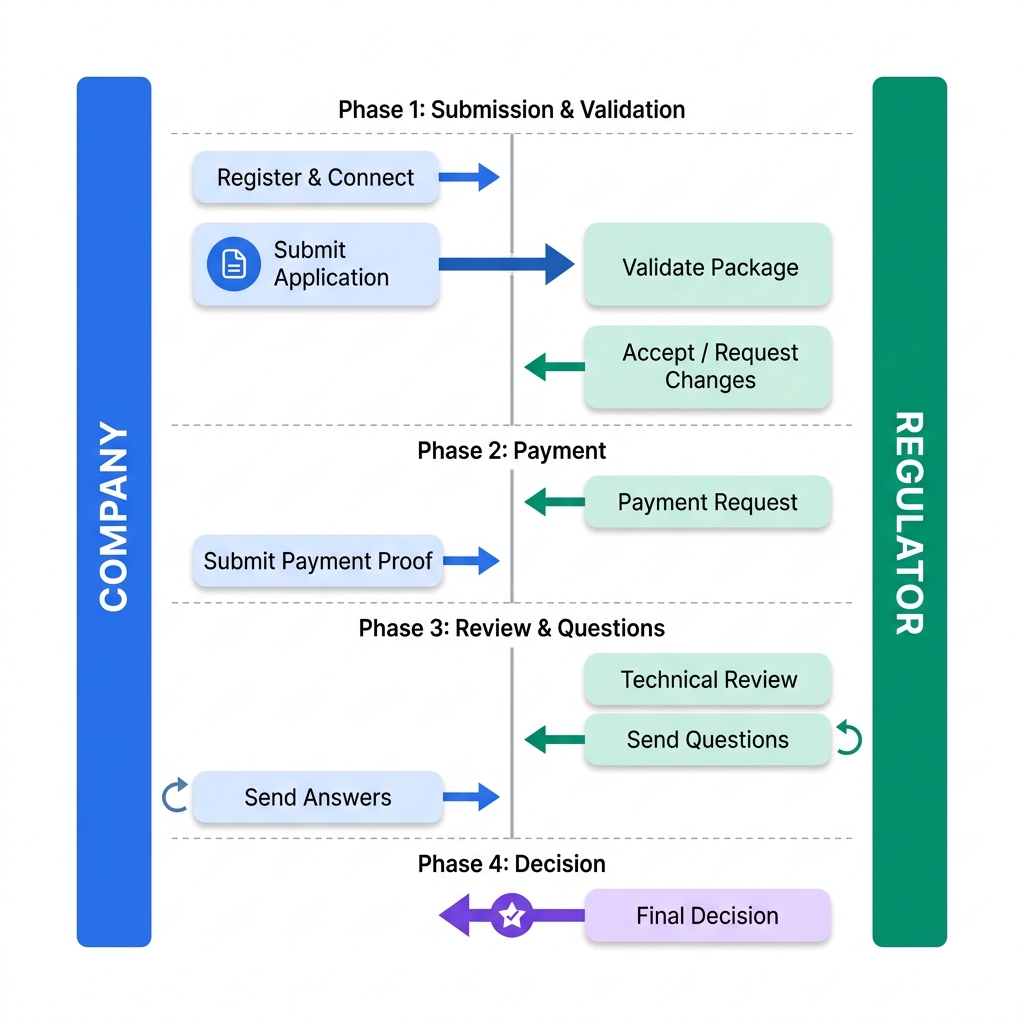
Every interaction (submission, question, decision) is a Task. Tasks carry metadata (who, what, when) and reference documents via Task.input and Task.output.
Each uploaded file gets a metadata wrapper (title, type, CTD section). The regulator discovers files through the Task, downloading the payload only when needed.
Both parties subscribe to events (status changes, new Tasks). Notifications arrive instantly at configured endpoints — no polling required.
All Tasks within a single regulatory procedure share the same groupIdentifier, enabling portfolio-wide search and reporting.
The detailed exchange for a shelf-life update, with links to the example Task resources at each step. Jump straight to a key example:
One-time registration with the Regulator's API portal. The Regulator registers the Company as an Organization and provides API credentials. The Company also registers an Endpoint for subscription notifications.
The Company authenticates via OAuth2, confirming authorization to post resources for their medicinal products.
Granular "Index Pattern" instead of monolithic ZIP — high performance and scalability even for massive datasets.
| Content Type | FHIR Resource |
|---|---|
| PDF Documents | Binary |
| Structured Labeling (JSON) | Document Bundle |
| CMC Data | Transaction Bundle |
Each upload gets a DocumentReference — a "Library Card" with metadata and a pointer to the uploaded resource.
The Task is the "Orchestrator" — it holds procedure metadata and references every DocumentReference in Task.input.
Multiple reviews happen in parallel.
Regulator checks compliance of the scientific data.
Binary → DocumentReference → added as Task output)POST Questionnaire → DocumentReference → Question Task (input: DocRef)
POST QuestionnaireResponse → DocumentReference → added as Task output
If satisfactory → Question Task Completed → review continues.
sequenceDiagram
    participant C as Company
    participant R as Regulator

    %% Phase 0: Registration
    Note over C,R: Phase 0: Registration & Connection
    C->>R: 0.1 Register with Regulator Portal
    R-->>C: Client Credentials & Org ID
    C->>R: 0.2 OAuth2 Authentication

    %% Phase 1: Submission
    Note over C,R: Phase 1: Submission & Validation
    par Upload Binaries/Bundles
        C->>R: 1.1 POST PDFs (Binary)
        C->>R: 1.1 POST Labels (Document Bundles)
        C->>R: 1.1 POST CMC (Transaction Bundles)
    end
    C->>R: 1.2 POST DocumentReferences (IDs/Links)
    C->>R: 1.3 POST Task (Orchestrator Index)

    activate R
    R->>R: 2.0 Validate Application

    alt Validation Passes
        R-->>C: 3.1 Ack Receipt & Validation Results
    else Validation Fails
        R->>C: 4.1 Request Missing Documents
        C->>R: 4.2.1 Submit Missing Documents
        R->>R: 4.2.2 Re-validate
    end

    %% Phase 2: Review
    Note over C,R: Phase 2: Review Cycles

    par Parallel Checks
        rect rgb(240, 248, 255)
            Note right of R: Technical Review
            R->>R: 5.2.1 Check Compliance
        end

        rect rgb(255, 250, 240)
            Note right of R: Financial Review
            R->>R: Review Financials
            Note over R: 5.B.2 Invoice Sequence
            R->>R: POST Invoice (Binary/Resource)
            R->>R: POST DocumentReference
            R->>C: POST Payment Task (Input: DocRef)
            activate C
            Note over C: 5.B.3 Payment Sequence
            C->>C: POST Proof of Payment (Binary)
            C->>C: POST DocumentReference
            C-->>R: Update Task (Add Output DocRef)
            deactivate C
            R->>R: 5.B.4 Verify Proof & Set Task: completed
        end
    end

    loop Issue Resolution
        alt Issue Found
            Note over R: 5.3.1 Question Sequence
            R->>R: POST Questionnaire
            R->>R: POST DocumentReference
            R->>C: POST Question Task (Input: DocRef)
            activate C
            Note over C: 5.3.2 Response Sequence
            C->>C: POST QuestionnaireResponse
            C->>C: POST DocumentReference
            C-->>R: Update Task (Add Output DocRef)
            deactivate C
            R->>R: 5.3.3 Review & Set Task: completed
        else No Issues
            R->>R: Proceed to Decision
        end
    end

    %% Phase 3: Decision
    Note over C,R: Phase 3: Final Decision

    alt Approved
        R-->>C: 6.1 Notify Approval (Decision Letter)
    else Rejected
        R-->>C: 7.1 Notify Rejection
    end
    deactivate R
IG © 2025+ HL7 International / Biomedical Research and Regulation.
Package hl7.fhir.uv.apix#0.1.0 based on FHIR 5.0.0.
Generated
2026-10-19
Links: Table of Contents |
QA Report
| Version History |
 |
Propose a change
|
Propose a change