



API for the Exchange of Medicinal Product Information (APIX)
0.1.0 - ci-build

API for the Exchange of Medicinal Product Information (APIX)
0.1.0 - ci-build
API for the Exchange of Medicinal Product Information (APIX), published by HL7 International / Biomedical Research and Regulation. This guide is not an authorized publication; it is the continuous build for version 0.1.0 built by the FHIR (HL7® FHIR® Standard) CI Build. This version is based on the current content of https://github.com/HL7/APIX---API-Exchange-for-Medicinal-Products/ and changes regularly. See the Directory of published versions
| Page standards status: Informative |
A business-friendly walkthrough of how APIX orchestrates the regulatory lifecycle — from initial submission to final decision.
APIX uses a Task-based workflow model. Every regulatory interaction — submissions, questions, decisions, payments — is represented as a FHIR Task resource. The lifecycle of a regulatory procedure is a series of Tasks, each with a status that progresses from draft → requested → received → accepted → in-progress → completed. Both parties subscribe to real-time notifications so they instantly know when something changes.
The following diagram shows the complete lifecycle of a regulatory procedure through APIX — illustrating the back-and-forth exchange between Company and Regulator across all four phases.
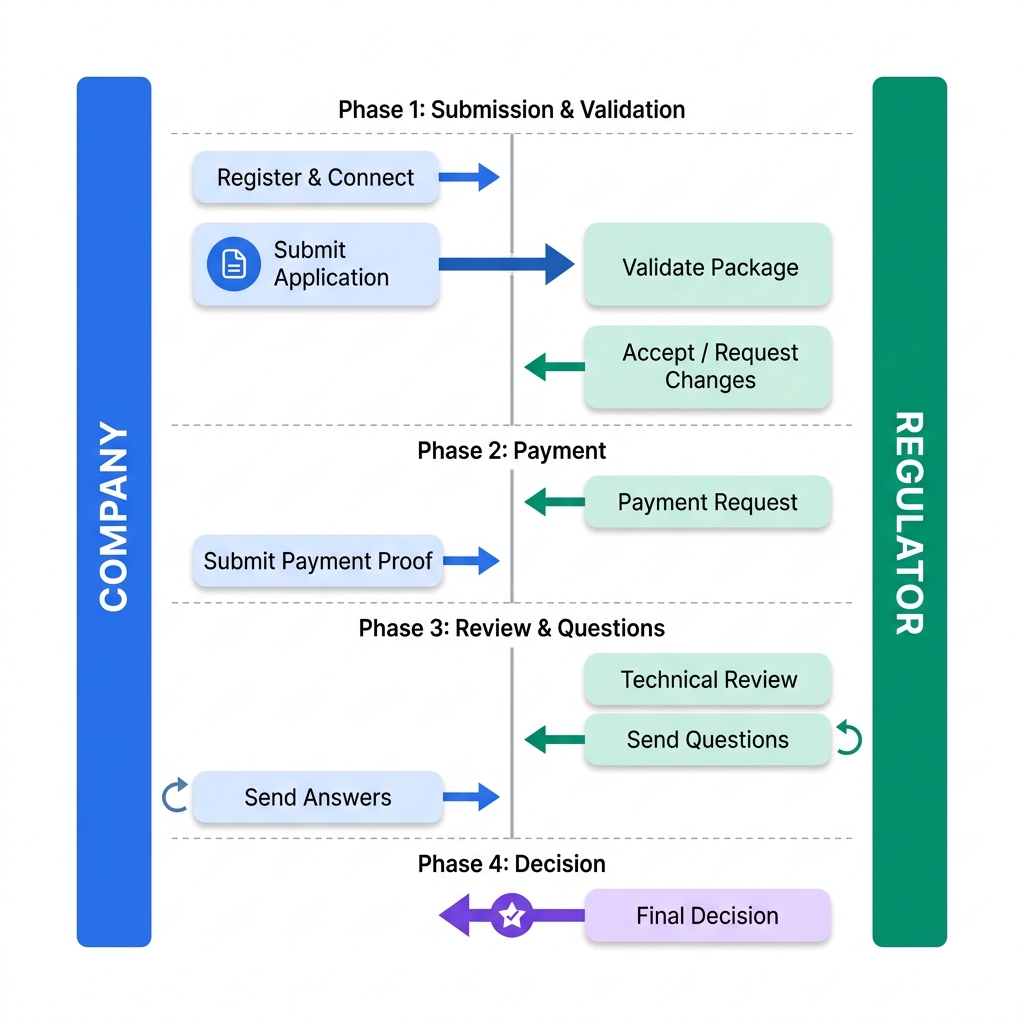
Every interaction (submission, question, decision) is a Task. Tasks carry metadata (who, what, when) and reference documents via Task.input and Task.output.
Each uploaded file gets a metadata wrapper (title, type, CTD section). The regulator discovers files through the Task, downloading the payload only when needed.
Both parties subscribe to events (status changes, new Tasks). Notifications arrive instantly at configured endpoints — no polling required.
All Tasks within a single regulatory procedure share the same groupIdentifier, enabling portfolio-wide search and reporting.
IG © 2025+ HL7 International / Biomedical Research and Regulation.
Package hl7.fhir.uv.apix#0.1.0 based on FHIR 5.0.0.
Generated
2026-08-12
Links: Table of Contents |
QA Report
| Version History |
 |
Propose a change
|
Propose a change