Netherlands - Generic Functions for data exchange Implementation Guide
0.10.0 -

Netherlands - Generic Functions for data exchange Implementation Guide
0.10.0 -
Netherlands - Generic Functions for data exchange Implementation Guide, published by Ministerie van Volksgezondheid, Welzijn en Sport. This guide is not an authorized publication; it is the continuous build for version 0.10.0 built by the FHIR (HL7® FHIR® Standard) CI Build. This version is based on the current content of https://github.com/minvws/generiekefuncties-docs/ and changes regularly. See the Directory of published versions
| Page standards status: Draft |
Generic Function Addressing (GFA) defines how healthcare parties can publish, discover, and use trusted addressing information for organizations, services, locations, and endpoints. Its purpose is to make healthcare data exchange interoperable and reliable by helping practitioners and systems route requests, referrals, data retrievals and notifications to the correct destination.
This specification is based on the IHE mCSD profile and reuses the actor and transaction definitions that were defined in that specification. You should be able to read this specification without prior knowledge of IHE mCSD, but a basic understanding of the FHIR specification is preferred.
This guide outlines the technical requirements and architectural principles underlying these generic functions. For related specifications/documents, see:
Consultation memo: Oplegnotitie Consultatie GF Adressering v0.9.0.pdf
Consultation reviewsheet: Reviewsheet consultatie GF Adressering v0.9.0.xlsx
Functional design: FO adressering v0.9.0.pdf
Technical design: GTO adressering v0.9.0.pdf
Here is a brief overview of the processes that are involved:
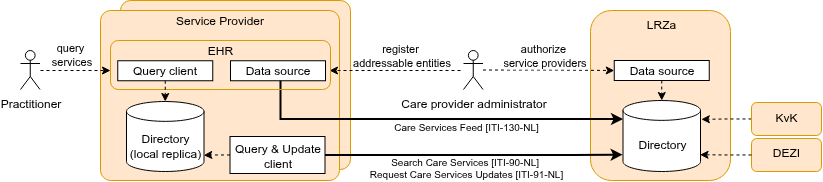
This overview implies a decentralized architecture with local Data Source actors and LRZa Directory replicas. An important central component is the LRZa Administration Directory, but this central component is not a crucial asset at data exchange runtime (only for creating or updating addressable entities). The LRZa Directory periodically imports Organization, Location and Practitioner(-Role) resources from the KvK and DEZI-registry.
This specification is based on the IHE mCSD profile and constrains and profiles the mCSD specification for the Dutch national context. The following national choices apply:
Data model profiling: The national profiles SHALL be based on NL-core where available and SHALL be aligned with relevant IHE mCSD profile constraints.
Device resource addition: The Device resource is added as a national extension to support efficient endpoint lookup and query-routing. Device usage SHALL support national workflows including GF Localization and TA Notified Pull.
LRZa Directory operational role:
The LRZa Directory SHALL NOT support matching of care service entities (e.g. query for a specific type of HealthcareService or Endpoint). Matching SHALL be performed on a local Directory (LRZa replica). The LRZa Directory SHALL act as the central consolidation and distribution point for the directory (a single consolidated view), and SHALL NOT have a direct operational role in healthcare data exchange transactions. For replication purposes, LRZa SHALL support search-type interactions from the mCSD ITI-90 transaction without search parameters for the initial load of the local replica. To bound load and keep operational matching on the replicas, the LRZa Directory SHALL restrict search operations to the minimum required for replication and SHALL apply rate limiting to operational consumers.
No deletes:
Addressable entities (e.g. a Location or HealthcareService) may become inactive/deprecated over time, but their identifier will be used and referred to from health records for their lifetime. Therefore, deletion of addressable entities SHALL not be supported by the LRZa Directory. The status of an addressable entity may be adjusted to inactive, off, entered-in-error or whatever appropriate status for the resource type.
Status changes are propagated to local replicas through the _history delta (ITI-91-NL). A Local Replica SHOULD apply the status change and exclude resources with status entered-in-error (and inactive/off where not applicable for the use case) from query results presented to Query Clients. A Local Replica MAY remove such resources locally after a retention period; the retention period is at the discretion of the replica operator. The identifier of a withdrawn entity SHALL NOT be reused.
Paging and consistent initial load:
For the initial load (ITI-90-NL search-type without search parameters), the LRZa Directory SHALL return results using paging: it SHALL include Bundle.link with relation = next until all results are returned, and SHALL enforce a maximum page size. The maximum page size is advertised by the server and specified in the LRZa SLA. Update Clients SHALL follow next links until exhausted.
To reduce unresolved references during loading, Update Clients SHOULD load resource types in an order where referenced resources generally precede referencing resources (e.g. Organization → Location → HealthcareService → Practitioner → PractitionerRole → Endpoint → Device → OrganizationAffiliation). Because the data model contains circular references (e.g. Organization.endpoint ↔ Endpoint.managingOrganization), no ordering can guarantee that every reference resolves during loading; this is why the order is SHOULD, not SHALL.
Because the paged initial load is not atomic, the Update Client SHALL take the server time reported in Bundle.meta.lastUpdated of the first page as the sync timestamp — the LRZa server time up to which the replica is in sync — and, once the paged load completes, SHALL perform an incremental history-type synchronization (ITI-91-NL) with _since set to that sync timestamp. Using the LRZa-reported time avoids client/server clock skew, and this captures mutations made during the load without requiring a server-side point-in-time snapshot. How the Update Client retains the sync timestamp is implementation-defined (e.g. a small stored value, or derived from the replica content); because synchronization is processed idempotently, an inclusive _since (re-fetching the boundary resources) is safe.
A Local Replica SHALL accept resources whose references cannot (yet) be resolved and SHALL NOT enforce referential integrity on write during the initial load; without this, replication breaks whenever a delta arrives before the resource it references. A Local Replica SHOULD NOT serve Query Clients until the initial load and the subsequent _history catch-up have completed.
Incremental synchronization (ITI-91-NL) is type-level ({resourceType}/_history, per mCSD ITI-91). Resource types SHOULD be synchronized on a single, common interval rather than per-type intervals: differentiating the interval per resource type would let a referencing resource of a fast-syncing type point at a not-yet-replicated resource of a slow-syncing type for a prolonged period. The LRZa SLA specifies the most frequent interval the Directory accepts (the rate limit), not how often a replica must synchronize; a replica chooses its own interval within that bound, short enough for the timeliness its use case needs. As a non-binding guideline, a synchronization interval of about 15 minutes is advised, which keeps endpoint and routing changes sufficiently fresh for referral and exchange workflows. Because synchronization can run in many decentralized instances, an Update Client SHOULD spread its synchronization moment across the interval (for example by applying a random offset) rather than synchronizing on fixed clock boundaries; this avoids a self-inflicted concurrency peak at the LRZa Directory. Synchronization is delta-based (_history), so a typical round returns a small or empty result and the average load per client is low; the peak driven by simultaneous requests is the relevant concern, which spreading mitigates.
The Update Client SHALL process incremental synchronization strictly sequentially rather than issuing _history requests in parallel: history entries SHALL be applied in chronological order (an older version SHALL NOT overwrite a newer one), and each history-type request (and each page of its response) SHALL complete and be applied before the next is issued. Sequential processing keeps the replica internally consistent, preserves the monotonic _since watermark on which retry depends, and bounds the request rate a single replica places on the LRZa Directory.
In steady state the Update Client therefore runs a simple loop: pull the incremental updates sequentially (advancing the _since watermark), wait for the synchronization interval (about 15 minutes, spread as described above), and repeat.
ETag (resource versionId) on read and on create/update responses, and SHALL honour the If-Match header on update interactions, rejecting an update that carries a stale version with HTTP 412 Precondition Failed (the server advertises this through versioning = versioned-update). A Data Source SHALL send If-Match on updates and, on a 412, re-read and re-apply. It prevents silent overwrite where a resource can be mutated through more than one channel (e.g. from CIBG as Data Source with update records from KvK/DEZI and one or more Data Sources). For more info on this topic, see FHIR transactional integrity and FHIR concurrencyEach actor will now be discussed in more detail.
The LRZa Directory is the central national directory for publishing and distributing addressable entities. It is the authoritative source for nationally governed directory content and provides interfaces for administration and retrieval of updates. The LRZa Directory is not intended for runtime matching in operational healthcare workflows; searching/matching SHALL be performed on local replicas. This Directory provides an API for the 'Data Source' and 'Update Client' that implements these CapabilityStatements:
A Data Source is a client/actor of an authorized party (e.g. an IT vendor or the care provider itself) that publishes and maintains directory entities on behalf of care providers. The Data Source actor SHALL use interactions conforming to CapabilityStatement ITI-130-NL, including create/update for Organization, Location, HealthcareService, Endpoint, and Device.
The Update Client refers to two separate actors defined in IHE mCSD a 'lite version' of the Query Client and the Update Client. These clients are grouped for the Dutch national context. This actor uses the search-type interaction (without search parameters) for the initial load of the local Directory (replica). It also periodically synchronizes from the LRZa Directory to a local replica using history-type interactions and _since parameter to request incremental updates. It consumes search interactions conforming to CapabilityStatement ITI-90-NL and update-oriented interactions defined in CapabilityStatement ITI-91-NL.
The Update Client synchronizes (replicates) directory content; it does not aggregate. Aggregation of source registers and self-registered data is performed centrally by the LRZa Directory. Incremental synchronization SHALL be processed idempotently (re-applying a delta SHALL be safe), and on transient failure the client SHALL retry from the last successfully processed _since watermark.
For more information, see the initial load and incremental sync examples.
The Query Client uses the local replica to find organizations, healthcare services, locations, endpoints, devices, and organizational relationships for routing and discovery. Note that the data exchange between Query Client and (local) Directory MAY use a proprietary interface. Use case 3 and use case 4 illustrate how to search for healthcare services and endpoints.
When selecting an Endpoint for data exchange, the Query Client SHALL only use Endpoints that have status active and whose period, when present, includes the current time. Within that selection, the Query Client matches on connectionType and payloadType (see use case 4). When multiple valid Endpoints remain for the same Organization or HealthcareService and the same connectionType/payloadType combination, this indicates either intentional redundancy (multiple endpoints due to different software systems) or a registration error.
Note: FHIR R4 does not define a search parameter for Endpoint.period, so the period is evaluated by the Query Client after retrieving candidate Endpoints from the local replica.
Transactions between Service Providers and the LRZa are defined here. Other (local or 3rd party) transactions are not specified here. These transactions MAY reuse/adopt IHE mCSD and FHIR transactions, but are not obliged.
The Data Source publishes entities to the LRZa Directory using create/update semantics as profiled in the Data Source capability statement. Submitted resources SHALL be validated against the applicable NL-GF profile; invalid resources SHALL be rejected with an OperationOutcome. Deletion is not supported (see National Constraint "No deletes"); withdrawal is expressed through a status change. Updates SHALL use optimistic locking (If-Match), which the server supports (see "Concurrency control on updates"). Resources may be published individually or in a transaction (all-or-nothing).
CapabilityStatement: ITI-130-NL
The Update Client loads/queries directory data for initial population of the local replication using search-type interactions without search parameters. The initial load is paged (see National Constraint "Paging and consistent initial load").
CapabilityStatement: ITI-90-NL
The Update Client retrieves changes from the LRZa Directory using history-type interactions per supported resource, optionally constrained by _since for incremental synchronization.
CapabilityStatement: ITI-91-NL
All transactions SHALL return a standard FHIR OperationOutcome with an appropriate HTTP status code (e.g. 400 malformed request, 412 stale version on a concurrent update, 422 profile validation failure, 429 too many requests when rate limiting applies, 5xx server error). Clients (Data Source, Update Client) SHALL implement retry with exponential backoff for transient failures (5xx, network) and SHALL process synchronization idempotently. When the LRZa Directory applies rate limiting and responds with 429 Too Many Requests, the client SHALL honor the Retry-After header where present and back off before retrying, rather than retrying immediately. A Query Client reads whatever the local replica currently holds; it cannot itself resolve staleness and relies on the Update Client's next synchronization to bring in newer data. Where a workflow cannot tolerate the replica's bounded staleness for a critical decision, the consuming application verifies the relevant information out of band (e.g. directly against the addressed party) rather than treating the directory as authoritative for that decision.
Within GF Addressing, several addressable entities are used to capture and publish information. An overview of the most common elements and relations between entities:
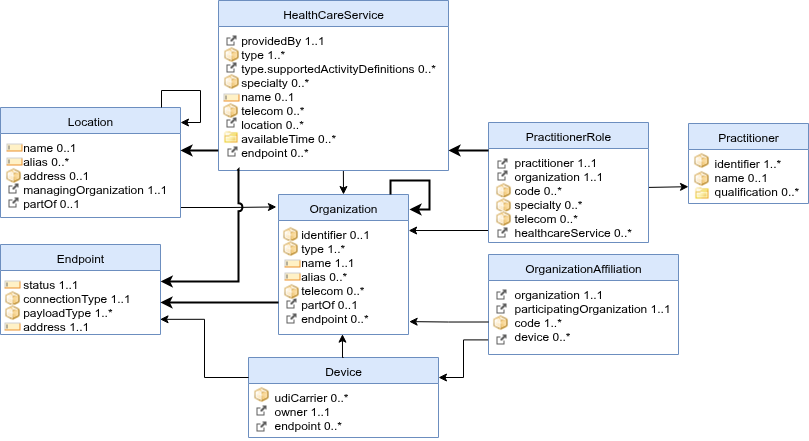
A brief description of the entities:
Healthcare services are used to publish which (medical) services are provided by a (child) Organization at some Location(s). Examples include surgical services, antenatal care services, or primary care services. These services in HealthcareService.type can be extended by references to specific ActivityDefinitions and PlanDefinitions that are supported. The combination of a HealthcareService offered at a Location may have specific attributes including contact person, hours of operation, etc. Typically, HealthcareServices use Endpoints that support receiving notifications or requests.
The NL-GF-HealthcareService profile is used to represent healthcare service offerings.
Key attributes:
| Attribute | Card. | Description |
|---|---|---|
| identifier (CustodianAssignedIdentifier) | 1..1 | identifier for provenance and traceability. |
| providedBy → Organization | 1..1 | The organization that provides this service. |
| type | 1..* | The type of service (required binding to NL-GF Service Types, including procedure and care-type codesystems in CBV, DHD, Geboortezorg, GGZ, NHG, NZa and WLZ). |
| type.supportedActivityDefinitions | 0..* | References to ActivityDefinitions or PlanDefinitions specifying the service type further. |
| specialty | 0..* | The specialty of the service (required binding). |
| name | 0..1 | A human-readable name for the service. |
| telecom | 0..* | Contact details for the service. |
| location → Location | 0..* | The location(s) where this service is available. |
| availableTime | 0..* | Times the service is available. |
| endpoint → Endpoint | 0..* | Technical endpoints for notifications or requests. |
Organizations are “umbrella” entities; these may be considered the administrative bodies under whose auspices care services are provided. Typically, (top-level)Organization-instances use Endpoints that publish healthcare data for other (healthcare) organizations to query. Departments of an institution, or other administrative units, may be represented as child Organizations of a parent Organization. The NL-GF-Organization profile is used to represent organizations and their hierarchical relations in this guide. Key attributes:
| Attribute | Card. | Description |
|---|---|---|
| identifier (URA or KVK) | 0..* | An Organization SHALL have a URA or KVK identifier, or be partOf another Organization. |
| type | 1..* | Type of organization, including an SBI (Standaard Bedrijfsindeling) code (extensible binding to NL-GF Organization Types). |
| name | 1..1 | The name of the organization. |
| alias | 0..* | Alternative names. |
| telecom | 0..* | Contact details. |
| partOf → Organization | 0..1 | The parent organization (for departments or sub-units). |
| endpoint → Endpoint | 0..* | Technical endpoints used by this organization. |
An addressable entity may be reachable for electronic data exchange through electronic Endpoint(s). An Endpoint may be a FHIR server, a DICOM web service, OAuth token endpoint, or some other mechanism. Typically, Organizations, Devices and HealthcareServices refer to Endpoints. This relationship is meant to indicate that, e.g., a care provider (Organization) uses an Endpoint. An Endpoint also refers to one specific organization that manages the Endpoint (e.g. IT vendor); this is not the organization using the endpoint. The NL-GF-Endpoints profile is used to represent electronic access points for data exchange. Key attributes:
| Attribute | Card. | Description |
|---|---|---|
| status | 1..1 | The operational status of the endpoint (e.g. active, off). |
| period | 0..1 | The interval during which the endpoint is expected to be operational. An absent period.end means the endpoint is operational until further notice. |
| connectionType | 1..1 | The type of connection (extensible binding to Core connection types and NL-GF Connection Types). |
| payloadType | 1..* | The payload type(s) supported (extensible binding to NL-GF Payload Types). |
| address | 1..1 | The technical address (URL) of the endpoint. |
| managingOrganization → Organization | 1..1 | The organization that manages this endpoint (e.g. IT vendor). |
An Endpoint's validity can expressed through status and period:
status describes the operational state of the endpoint itself (active, suspended, off, entered-in-error).period describes the interval during which the endpoint is expected to be operational. An Endpoint without period.end is operational until further notice. A period.start in the future MAY be used to announce an endpoint ahead of its activation; no separate scheduling mechanism is provided.When a care provider migrates to another system, the Endpoints of the old and the new system may be registered simultaneously, but their periods SHALL be set such that at most one of them is valid at any moment: the superseded Endpoint receives a period.end at the planned cutover moment and the replacing Endpoint a period.start at that same moment. This removes any ambiguity about which Endpoint to use during a transition: data exchange partners select the Endpoint whose period includes the current time (see Query Client). When a single Data Source is authorized for both changes, it SHOULD apply them atomically in one FHIR transaction Bundle. When two different service providers are involved, both can safely register their change ahead of the cutover moment, because Endpoint selection is driven by period, not by registration time.
After the old system has actually been taken out of operation, its Endpoint status SHOULD be set to off or deleted.
Use case 5 illustrates a transition between systems.
Device resources are, in GF Addressing, used to represent software applications or technical systems involved in healthcare data exchange. A Device can reference one or more Endpoints that it uses/provides, enabling efficient endpoint lookup and query-routing in workflows such as GF Localization, eOverdracht, and TA Notified Pull. In this guide, Devices are also referenced from OrganizationAffiliation to indicate which technical system is authorized in the relationship between a care provider and an IT vendor. The NL-GF-Device profile is used to represent these technical systems and their endpoint references. Key attributes:
| Attribute | Card. | Description |
|---|---|---|
| identifier (DeviceUrn) | 1..1 | A globally unique URN identifier for the device/application. |
| udiCarrier | 0..* | UDI carrier information from e.g. EUDAMED or GS1 register (if applicable). |
| owner → Organization | 1..1 | The organization that owns/manages this device. |
| endpoint → Endpoint (extension) | 0..* | Endpoints associated with this device. |
Locations are physical places where care can be delivered such as buildings (NL: Vestiging), wards, rooms, or vehicles. A Location may have geographic attributes (address, geocode), attributes regarding its hours of operation, etc. Each Location is related to one Organization. A location may have a hierarchical relationship with other locations (e.g. building > floor > room). The NL-GF-Location profile is used to represent physical care-delivery locations. Key attributes:
| Attribute | Card. | Description |
|---|---|---|
| identifier (CustodianAssignedIdentifier) | 1..1 | identifier for provenance and traceability. |
| name | 1..1 | The name of the location. |
| type | 1..1 | The type of location. |
| status | 1..1 | The operational status (e.g. active, inactive). |
| address | 0..1 | The physical address. |
| managingOrganization → Organization | 1..1 | The organization responsible for this location. |
| partOf → Location | 0..1 | The parent location (e.g. building → floor → room). |
Practitioner resources represent healthcare professionals as persons, independent of where or in which role they are currently working. In GF Addressing, a Practitioner is used as the stable identity anchor for professional identification across organizations, and can be linked to one or more PractitionerRole resources that describe context-specific roles and specialties. Practitioner identifiers typically include a DEZI number and MAY include a BIG number for professional registration details. The NL-GF-Practitioner profile is used to represent healthcare professionals. Key attributes:
| Attribute | Card. | Description |
|---|---|---|
| identifier (DEZI/BIG) | 0..* | Professional identifiers, typically DEZI and optionally BIG. |
| name | 1..* | Human name of the practitioner. |
| qualification | 0..* | Professional qualifications, licenses, or registrations relevant for care delivery. |
PractitionerRole resources are used to define the specific roles, specialties, and responsibilities that a Practitioner holds within an Organization. PractitionerRole enables precise modeling of relationships between practitioners and organizations and MAY represent employment relationships. It supports scenarios like assigning practitioners to departments, specifying their roles (e.g., surgeon, nurse), and linking them to particular healthcare services or locations. A PractitionerRole may have contact details for phone, mail, or direct messaging. Because the directory is publicly queryable, a PractitionerRole SHALL NOT contain data that may not be shared publicly (e.g. personal contact details of an individual that are not intended for public addressing); only information meant to be publicly available for addressing purposes is published. The NL-GF-PractitionerRole profile is used to represent practitioner roles and responsibilities within organizations. Key attributes:
| Attribute | Card. | Description |
|---|---|---|
| identifier (CustodianAssignedIdentifier) | 1..1 | Identifier for provenance and traceability; UZI/DEZI-number |
| practitioner → Practitioner | 1..1 | The practitioner fulfilling this role, identified by its, e.g., BIG-number. |
| organization → Organization | 1..1 | The organization where the practitioner works. |
| code | 1..* | The role(s) the practitioner performs. |
| specialty | 0..* | The specialty of the practitioner in this role. |
| telecom | 0..* | Contact details (only information that may be shared publicly for addressing). |
OrganizationAffiliation resources are used to represent relationships between organizations, such as a software vendor managing the Endpoint that is used by a care provider. The LRZa Directory uses OrganizationAffiliations to authorize incoming create and update interactions of service providers. It could also be used to represent multiple care providers working together under some agreement (e.g. in a region). The NL-GF-OrganizationAffiliation profile is used to represent organizational relationships in this guide. Key attributes:
| Attribute | Card. | Description |
|---|---|---|
| active | 1..1 | Whether this affiliation is currently active. |
| organization → Organization | 1..1 | The care provider organization. |
| participatingOrganization → Organization | 1..1 | The affiliated party (e.g. IT vendor). |
| code | 1..* | The type of affiliation (required binding to NL-GF Authorization Types). |
| device (extension) | 0..* | Device identifier(s) authorized in this affiliation. |
A Data Source actor SHALL use mTLS for transport layer security. Qualified certificates from Qualified Trusted Service Providers (like PKIoverheid) should be trusted. (GF-Adressering, ADR#178).
The LRZa-Directory SHALL only support creation/updates of OrganizationAffiliations by Care Providers, not by the parties that are being authorized (the .participatingOrganization).
This sequence shows a two-step onboarding flow: first, the care provider administrator creates an OrganizationAffiliation that authorizes the service provider (and optionally a Device). After this authorization exists, the service provider is able to register their Endpoints and Devices (if not already registered). Finally, the care provider administrator is able to register and update the remaining mCSD resource types in the application of the service provider (e.g. the EHR).
The following sequence diagram illustrates how an Update Client performs the paged initial load of a local replica, records the sync timestamp, and runs a _history catch-up before serving Query Clients:
The following sequence diagram illustrates the periodic incremental synchronization, including delta processing, status changes, retry on transient failure, and advancing the sync timestamp:
The following sequence diagram illustrates the recommended optimistic-locking flow when a Data Source updates a resource: it reads the current ETag, sends the update with If-Match, and — if another writer advanced the version first — receives 412 Precondition Failed, then re-reads and retries:
The patient, Vera Brooks, consults with her physician who recommends surgery. The physician can assist the patient in finding a suitable care provider, taking into consideration the location and specialty for orthopedic surgeons.
Dr. West just created a referral (for patient Vera Brooks from use case #3). The EHR has to notify Hospital East and the Orthopedic department of this referral. This may include some recurring requests:
The general practice from use case #1 replaces its EHR system and plans a cutover moment at which the new system takes over:
period.start set to the cutover moment.period.end at the same cutover moment — applied by the currently authorized service provider, or combined with the previous step in one transaction Bundle when a single Data Source is authorized for both changes.off.