SMART Imaging Access
0.1.0 - ci-build

SMART Imaging Access
0.1.0 - ci-build
SMART Imaging Access, published by Argonaut Project. This guide is not an authorized publication; it is the continuous build for version 0.1.0 built by the FHIR (HL7® FHIR® Standard) CI Build. This version is based on the current content of https://github.com/argonautproject/smart-imaging/ and changes regularly. See the Directory of published versions
This page is non-normative. Using the functional roles defined on the home page, it describes how cooperating services decide which studies to release and enforce those decisions during image retrieval.
These fictional examples use permissions configured by the health system.
Elena uses a SMART-connected app to collect records for an independent orthopedic opinion about her 16-year-old daughter Maya’s ankle injury. The app retrieves the ankle X-ray, its report, and relevant clinical records under Elena’s configured proxy access.
Maya also has a pelvic ultrasound from an encounter marked confidential. The health system’s policy permits Elena to receive the ankle study but excludes the ultrasound from her proxy access.
The app’s token has Maya’s patient context, but that does not grant Elena access to every study belonging to Maya. The ImagingStudy search returns the ankle study and its endpoint, omits the ultrasound, and the retrieval service does not release the ultrasound under Elena’s authorization.
A health system runs a background service that collects newly available cardiac images and reports for continuous quality improvement. The service uses SMART Backend Services. The health system configures its permissions to cover cardiac studies for patients included in the program.
Jordan Ellis is included in the program and has a cardiac MRI and a knee X-ray. The service is permitted to retrieve the cardiac MRI, but not the knee X-ray. Its system/ImagingStudy.rs scope remains subject to those configured permissions.
In both cases, the study list and image retrieval need to respect the same access restriction. The client does not need an in-band representation of the organization’s proxy-access rules, consent records, or quality-review program permissions.
The DICOMweb service can combine several sources of information to decide whether to release a requested study:
Access token — The credential an app presents to show which authorization it is using. The service checks that the token is valid for the request and uses its validated client identity, scopes, and any supplied patient or user context. An opaque token can be checked through introspection without requiring the service to interpret its contents.
Capability URL — A retrieval URL that carries or identifies study-specific permissions bound to the app’s SMART token. It lets the Imaging FHIR Server pass a release decision to the DICOMweb Server. The permission may be encoded in protected URL contents or stored by the retrieval service under an opaque identifier. The DICOMweb Server validates the token, the capability, and their binding.
Token introspection — The Authorization Server can supply the token’s status, granted scopes, client identity, and available user or patient context. Standard introspection fields do not necessarily express all the study-level restrictions the service needs to enforce.
A FHIR query using the caller’s token — The service validates the token for the requested retrieval and queries the trusted Imaging FHIR Server for the patient and Study Instance UID using that same token. The Imaging FHIR Server applies the caller’s study-access policy; an authorized matching result establishes the study-specific permission. The token must be valid for both services.
An explicit authorization-decision API — Instead of querying ImagingStudy, the service can ask directly whether the original caller is permitted to retrieve a study. The requesting service authenticates itself and supplies trusted caller context. This guide does not define that internal API.
Locally configured or shared policy — The service can apply its own configured rules or consult policy shared with the Authorization Server or Imaging FHIR Server. The cooperating systems agree how the relevant permissions and policy changes are communicated and enforced.
These mechanisms can be combined. For example, a DICOMweb service might validate a token through introspection, validate a token-bound capability URL for the requested study, and consult an internal decision service for current consent restrictions. Another might validate the token and enforce a capability issued after the Imaging FHIR Server has evaluated those restrictions.
The client presents the same SMART token for study search and every image retrieval, using the Endpoint returned by the Imaging FHIR Server. This applies to App Launch and Backend Services; the client does not need to inspect the URL to determine how the server evaluates access.
The diagrams show three ways to divide policy evaluation and retrieval enforcement. They begin after token issuance. Solid arrows show client interactions; dashed arrows show internal coordination. Boxes group responsibilities and do not necessarily represent separate products.
A gateway provides both the Imaging FHIR Server and DICOMweb Server. It combines token validation, such as introspection, with locally configured or shared policy. It uses those permissions to filter the study list and check each image request before retrieving data from an internal image archive, such as a PACS.
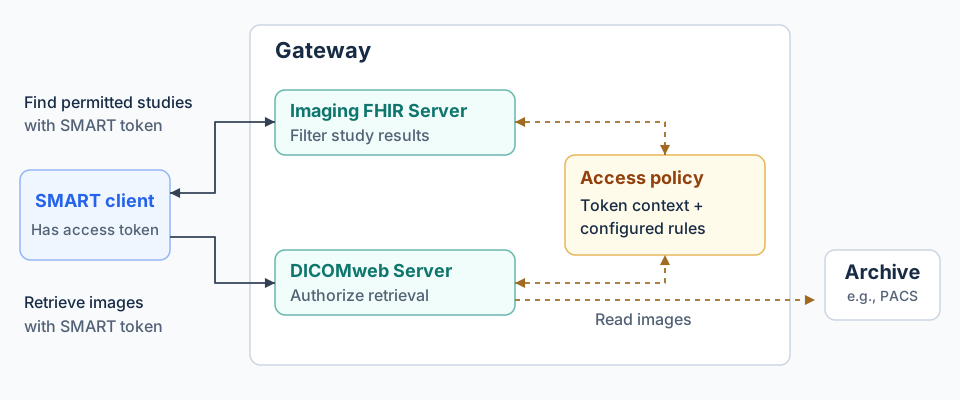
The gateway provides both imaging roles. Its access to the archive is separate from the client’s access to the gateway.
For Elena’s request, the gateway applies the configured proxy-access restrictions. For the quality-review service’s request, it applies the health system’s configured cardiac-study permissions. Its own archive credentials may allow broader access, but it releases only what the requesting client is permitted to retrieve. Other client-accessible routes must not bypass that enforcement.
The Imaging FHIR Server evaluates the caller’s permissions and returns a capability URL for each permitted study. The DICOMweb Server validates the capability, the app’s SMART token, and their binding before retrieving images. The services agree how to represent and enforce the permissions carried by the URL.
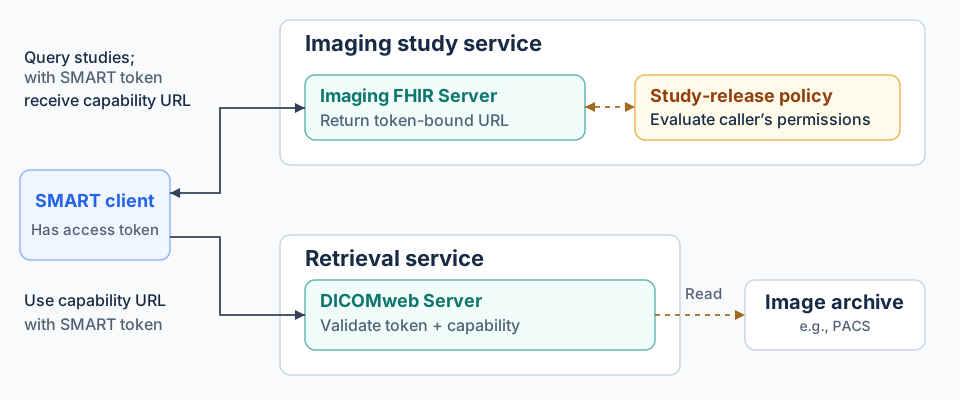
The client presents the SMART token used for the study search when retrieving images through the capability URL. The DICOMweb Server checks the token's validity, the capability's binding to that token, and all applicable restrictions.
Return token-specific Endpoints as response-local Bundle entries, as described in Finding studies. The Bundle example shows the UUID reference and HTTPS retrieval address.
The capability is carried in the returned Endpoint’s WADO-RS base URL; the client constructs study and other retrieval paths as specified in Retrieving images. The issuer and retrieval service agree how to represent and validate capabilities within the guide’s lifetime and access requirements. The service rejects requests that substitute an unauthorized study identifier into a valid retrieval URL.
The Imaging FHIR Server filters the study list, and the DICOMweb Server checks the caller’s permission when an image request arrives. In the diagram, it asks the system responsible for study-access decisions before reading the archive.
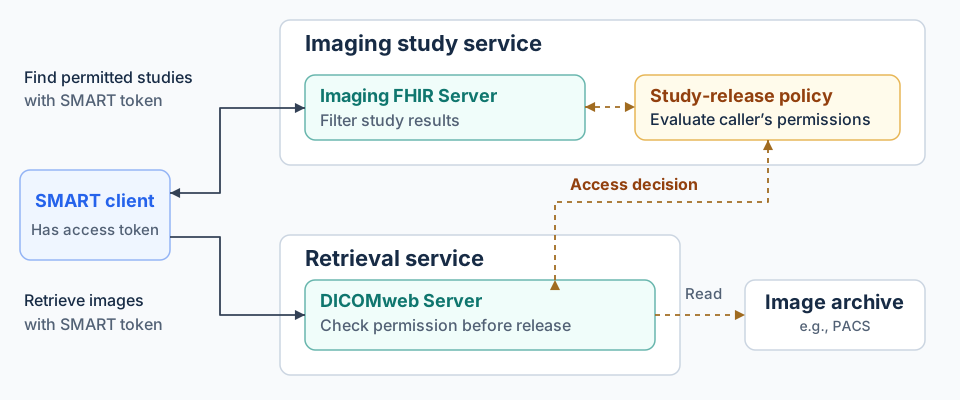
The check uses the original caller’s authorization, not the retrieval service’s broader archive permissions.
For each retrieval, the DICOMweb Server performs the required token and access checks, using cooperating services where appropriate. The callback establishes permission for the requested study through an authorized ImagingStudy query or an explicit decision API. The service combines that decision with the token’s scopes, patient context where applicable, and any endpoint-specific restrictions. A service with sufficient token context and local policy can make the decision without the illustrated callback.
The implementation needs to handle unavailable decision services and avoid circular checks—for example, a FHIR query that waits for an archive request that is itself waiting for the same FHIR query.
Each retrieval requires a valid SMART token. Capability URLs are also subject to their own expiry and revocation conditions. Document how capabilities expire, how decisions are cached, and how policy changes take effect. A refreshed token may require a new Endpoint from an authorized study search. See the lifetime and recovery requirements.
Record the client, any represented user, the patient, and the study. Correlate the presented token, any capability, and the retrieval decision without exposing credentials in logs.
Apply authorization to all supported retrieval forms: metadata, rendered images, frames, instances, and full studies. A request made directly to a known image URL needs protection even if it did not follow a study search.
Implementers can combine these approaches. EHR vendors, PACS vendors, authorization-service providers, and gateway implementers can share the work without changing the client’s study-search and retrieval protocol.
These sources describe relevant concepts and building blocks. They do not establish that a particular product implements every flow shown here.