
Kenya Disease Surveillance FHIR Implementation Guide.
0.1.0 - ci-build

Kenya Disease Surveillance FHIR Implementation Guide.
0.1.0 - ci-build
Kenya Disease Surveillance FHIR Implementation Guide., published by Kenya National Public Health Institute. This guide is not an authorized publication; it is the continuous build for version 0.1.0 built by the FHIR (HL7® FHIR® Standard) CI Build. This version is based on the current content of https://github.com/IntelliSOFT-Consulting/Surveillance-FHIR-IG/ and changes regularly. See the Directory of published versions
A business process is a set of related activities or tasks performed together to achieve the objectives of the health programme area, such as registration, counselling, referrals. Workflows are a visual representation of the progression of activities (tasks, events, interactions) that are performed within the business process. The workflow provides a “story” for the business process being diagrammed and is used to enhance communication and collaboration among users, stakeholders and engineers.
This DAK focuses on key business processes conducted by the personas (described in Component 2) as part of disease surveillance and response service provision. These business processes are described in table below. For each of these business processes, the corresponding business processes, data elements and decision-support needs are detailed within the following sections of this document.
| Corresponding letter for the process | Process Name | Process ID | Personas | Objectives | Task set | |
|---|---|---|---|---|---|---|
| Title | ID used to reference this process throughout the DAK | Individuals interacting to complete the process | A concrete statement describing what the process seeks to achieve | The general set of activities performed within the process | ||
| A | Community Event-Based Surveillance | IDSR.A |
|
To detect, verify and report the presence of any pre-defined signals for public health events at the community level. |
Starting point: The CHW/CHP receives signal information, and reports to CHAs.
|
|
| B | Hospital Event-Based Surveillance | IDSR.B |
|
To take a comprehensive client history, conduct a clinical examination, request for laboratory investigation, report to the next level and provide medical care. |
Starting point: Client visits the health facility to seek medical attention.
|
|
| C | Veterinary Event Based Surveillance | IDSR.C |
|
To detect zoonotic events in animals, amongst themselves and contacts, verify and report the presence of any pre-defined signals for public health events |
Starting point: Client reports of animal disease symptoms or outbreak of disease in animals.
|
|
| D | Livestock Event-Based Surveillance | IDSR.D |
|
To detect zoonotic events in animals, amongst themselves and contacts, verify and report the presence of any pre-defined signals for public health events. |
Starting point: Client reports of animal disease symptoms or outbreak of disease in animals.
|
|
| E | Hotline/Phone Event Based Surveillance | IDSR.E |
|
To detect public health events reported through calls from community members. |
Starting point: The call center receives a call reporting an event.
|
|
| F | Media Scanning Event Based Surveillance | IDSR.F |
|
To detect public health events reported through media sources or internet bio-surveillance systems and report to next level authorities. |
Starting point: Manual Media Scanning by dedicated staff or digital surveillance system scanning of online sources for health events and emerging threats .
|
|
| G | Laboratory Surveillance | IDSR.G |
|
To analyse samples or specimens to allow for detection of outbreaks, confirmation, and monitoring mutations of pathogens. |
Starting point: A health worker orders a lab test for a suspected case.
|
|
| H | Point of Entry Surveillance | IDSR.H |
|
To detect, report and respond to ill travellers with suspected/confirmed cases of communicable diseases or other public health events. |
Starting point: During screening, port health Staff detects an ill traveller OR Conveyance crew (Airline/ship/train/bus) report/notify of ill travelers or deaths on board
|
|
| I | Acute Humanitarian Emergency | IDSR.I |
|
To track emerging health threats, detect outbreaks early, and guide emergency interventions. |
tarting point: Risk Assessment & Priority Disease Identification
|
|
| J | Food Surveillance | IDSR.J |
|
To detect and manage food borne outbreaks early |
Starting point: Reception of sampling prompt
|
|
| K | Reporting and monitoring of indicators | IDSR.K |
|
Starting point: Detection and Initial report by the fastest means possible (telephone, e-mail, text message, social media) to Sub county health team
|
| Symbol | Symbol Name | Description |
|---|---|---|
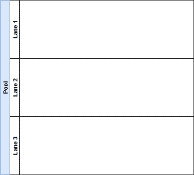 |
Pool |
The pool assumes process control – in other words, it assigns the tasks. A pool consists of one or more “swim lanes” that depict all the individuals or types of users that are involved in carrying out the business process or workflow. Diagrams should be clear, neat and easy for all viewers to understand the relationships across the different swim lanes. For example, a pool would depict the business process of conducting an outreach activity, which involves multiple stakeholders represented by different lanes in that pool. A business process diagram can contain two or more pools that connect through message flows (messages received from outside of the pool). This indicates different process owners collaborating and exchanging information. For example, in the case of a referral, the health facility “A” (the referring facility) represents the process owner that assigns internally the tasks for the actors represented as swim lanes in the pool. The health facility “B” (the receiving facility) has allocated its own pool and it’s considered a different process owner, with the same role. These 2 facilities exchange information relevant for a referral (client history, referral details, etc.), represented as message flows, but each facility has control only over the internal activities, without directly impacting the activities of the other facility. |
 |
Swim Lane | Each individual or type of user is assigned to a swim lane, a designated area for noting the activities performed or expected of that specific actor. For example, a family planning health worker may have one swim lane; the supervisor would be in another swim lane; the clients/patients would be classified in another swim lane. If the activities can be performed by either actor, then those activities can be depicted overlapping the two relevant swim lanes. |
 |
Start event or Trigger Event | The workflow diagram should contain both a start and an end event, defining the beginning and completion of the task, respectively. |
 |
Start event message | This is a type of a start event. In some instances, the workflow can start with a message. A “message” in business process model and notation does not mean only letters, emails or calls, but includes also information exchanged between 2 different systems, such as data exchange, notifications, etc. Any action that refers to a specific addressee and represents or contains information for the addressee is a message. |
 |
End Event | There can be multiple end events depicted across multiple swimlanes in a business process diagram. However, for diagram clarity, there should only be one end event per swim lane. |
 |
Activity, Process, Step or Task | Each activity should start with a verb, e.g. for example, “Register client”, or “Calculate risk”. Between the start and end of a task, there should be a series of activities noted - in the successive actions performed by the actor for that swim lane. There can also be sub-processes within each activity (see next row). |
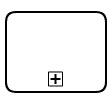 |
Activity with sub-process | This symbol denotes an activity that has a much longer sub-process, to be detailed in another diagram. If the diagram starts to become too complex and unhelpful, the sub-process symbol should be used to reference this sub-another process depicted on another diagram page. (Activity with sub-process in grey box is not covered in this DAK). |
 |
Activity with business rule | This denotes a decision-making activity that requires the business rule, decision-support logic or scheduling logic, to be detailed in a decision-support table. This means that the logic described in the decision-support table will come into play during this activity as outlined in the business process. This is usually reserved for complex decisions. |
 |
Sequence flow | This symbol denotes the flow direction from one process to the next. The end event should not have any output arrows. All symbols (except Start event) may have an unlimited number of input arrows. All symbols (except End event and the Gateway) should have one and only one output arrow, leading to a new symbol, looping back to a previously used symbol, or pointing to the Eend event symbol. Connecting arrows should not intersect (cross) each other. |
 |
Message flow | This denotes the flow of data or information from one process to another. This is usually used for when data are shared across pools. |
 |
Exclusive Gateway | This symbol is used to depict a fork, or decision point, in the workflow, which may be a simple binary (e.g. yes/no) filter with two corresponding output arrows, or a different set of outputs. There should only be two different outputs that originate from the decision point. If you find yourself needing more than two output or sequence flow arrows, you most likely are trying to depict decision-support logic or a business rule. This should be depicted as an activity with business rule (above) instead. |
 |
Parallel Gateway | The parallel gateway can be used to model concurrency in a process. This type of gateway allows forking into multiple paths of execution or joining multiple incoming paths of execution. An important difference with other gateway types is that the parallel gateway does not evaluate conditions. |
 |
Throw – Link | The “Throw–Link” serves as the start of an off-page connector. It is the end of the process when there is no more room on your page for that workflow. It is the end of a process on your current page or the end of a sub-process that is part of a larger process. When used, there will need to be a corresponding “Catch–Link” on the other page that shows the continuation of the workflow. that follows the “Throw–Link”. |
 |
Catch – Link | The “Catch–Link” serves as an off-page connector. It is the start of a new process that follows a previous process, a continuation of a process from a previous page, on a different page from the “Throw – Link” or the start of a sub-process that is part of a larger process. Every “CatchLink” needs to align with at least one corresponding There needs to be a “Throw–Link” that is aligned to the prior process diagram “Catch – Link”. |
 |
Ad hoc subprocess | An ad hoc subprocess can contain multiple activities (tasks or subprocesses), which can be executed in any order, executed several times, or skipped. However, not all these activities need to be finished before moving on to the next activity. |
|
Ad hoc subprocess | An ad hoc subprocess can contain multiple activities (tasks or subprocesses), which can be executed in any order, executed several times, or skipped. However, not all these activities need to be finished before moving on to the next activity. |
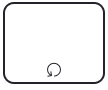 |
Loop activity | This “Loop Activity” or loop task symbolizes an activity or task that is repeated until it no longer needs to be repeated. For example, vaccine administration can happen as many times as the number of vaccines that need to be given. |
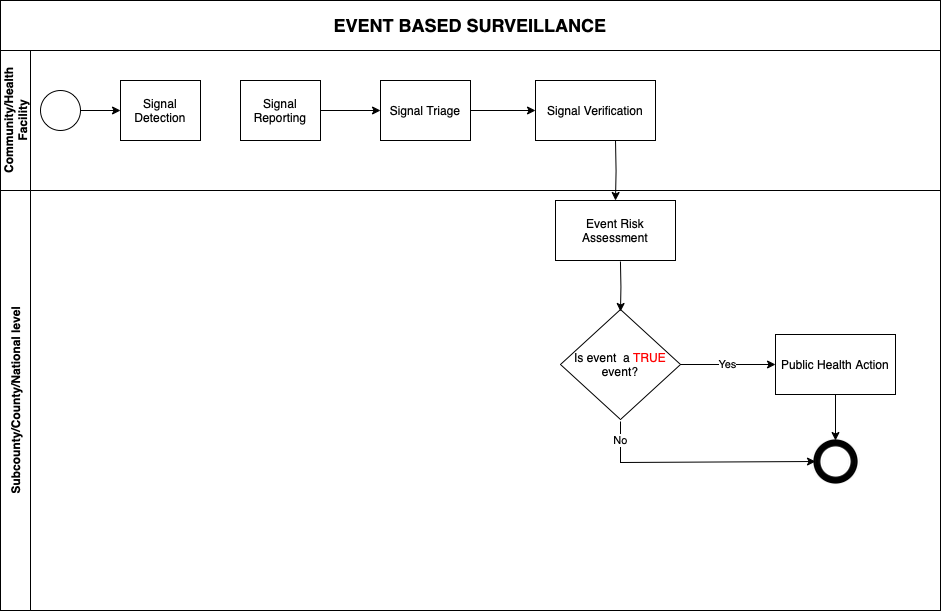
Signal triage is the process of sorting out (filtering) reported signals to identify which ones are mostly likely to be real events.
Guiding triage questions:
1. Does the reported information match any pre-defined EBS signal?
2. Is the information relevant for EWAR? (Is it on-going?)
3. Has the signal not been reported previously (Not a duplicate)?
Any signal that gets a “YES” response to all the three questions is subjected to verification
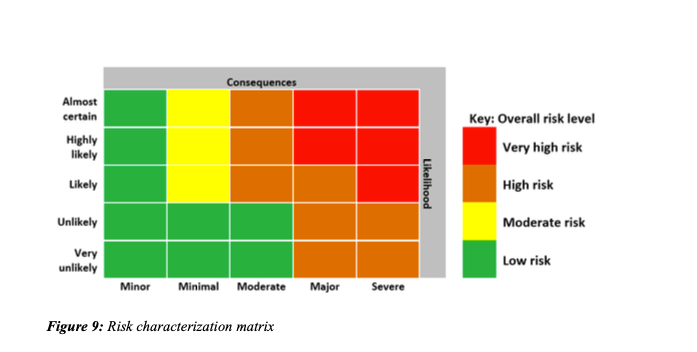
Risk Assessment is the process of determining the level of risk of an event poses to public health and recommending the appropriate level response needed
Tools such as risk characterization matrix can be used to guide decision making.
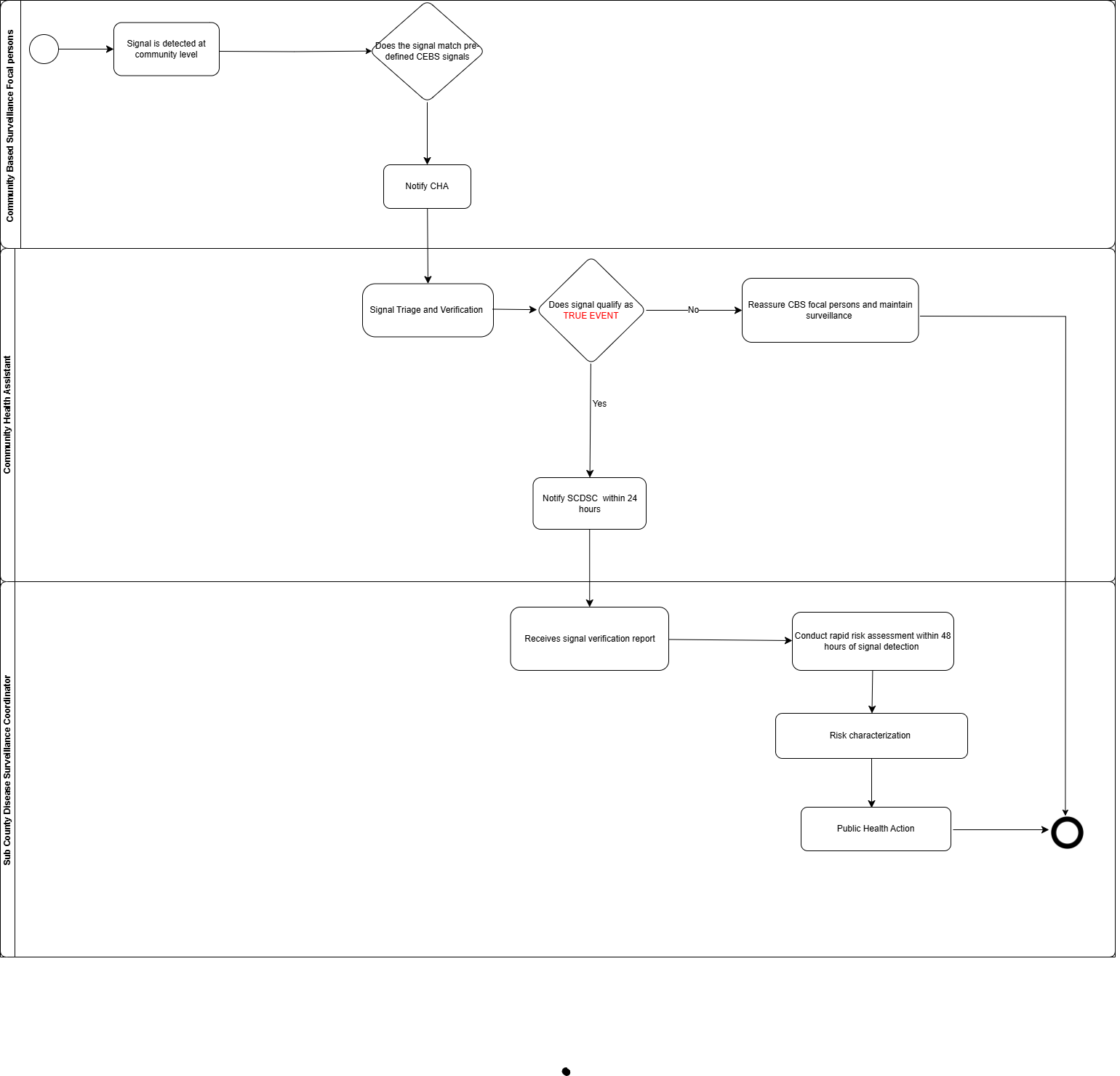
Objective: To detect, verify and report the presence of any pre-defined signals for public health events at the community level.
Community Event Based Surveillance pre-defined signals:
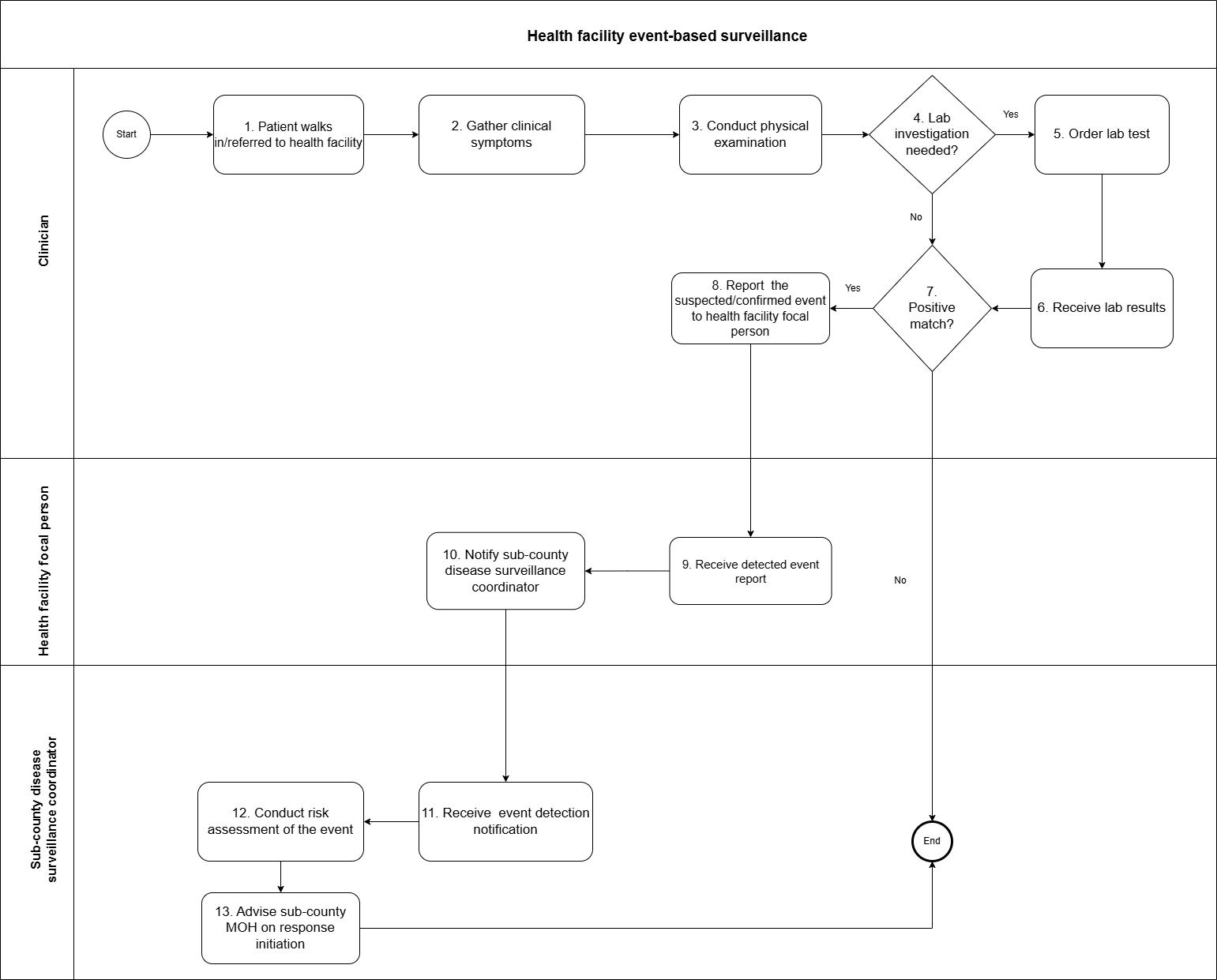
Objective: To promptly diagnose and report events that are likely to present threats to public health at health facilities by health care workers.
Health Facility EBS pre-defined signals:
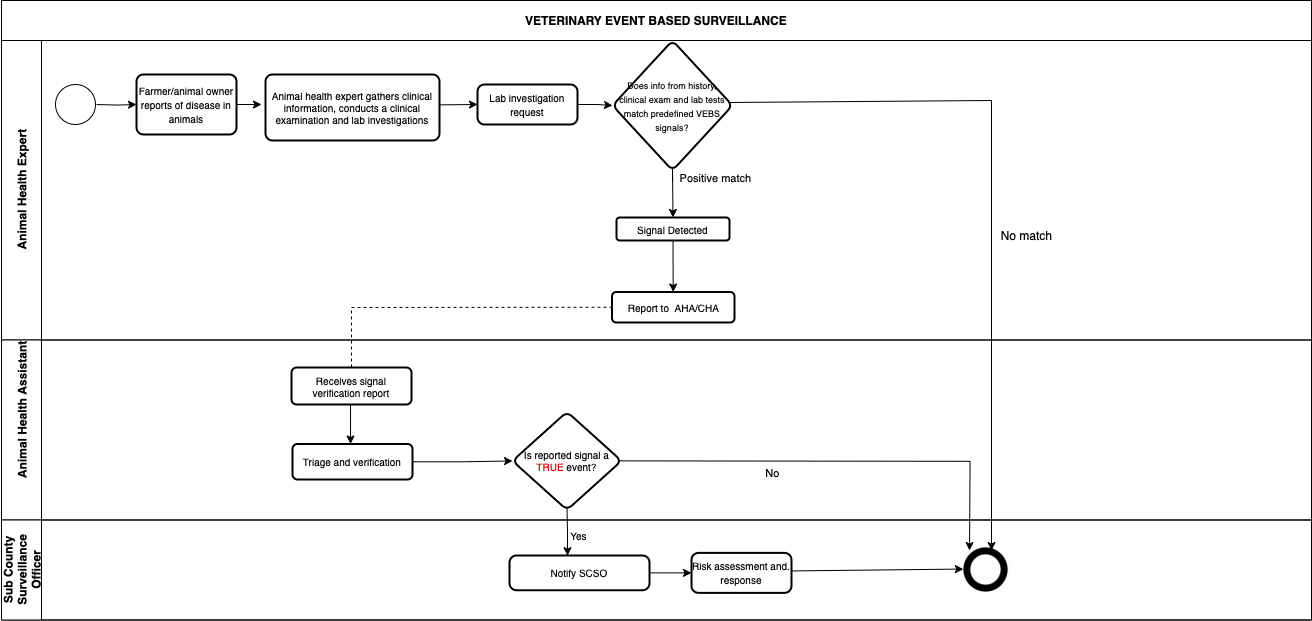
Objective: To detect zoonotic events in animals, amongst themselves and contacts, verify and report the presence of any pre-defined signals for public health events.
Veterinary EBS pre-defined signals:

Objective: To collect, test, and report laboratory results in a timely manner.

Objective: To detect and prevent the introduction or spread of infectious diseases and other public health threats through designated points of entry (ports, airports and ground crossings); alert and response to international public health emergencies; global partnerships and international collaboration
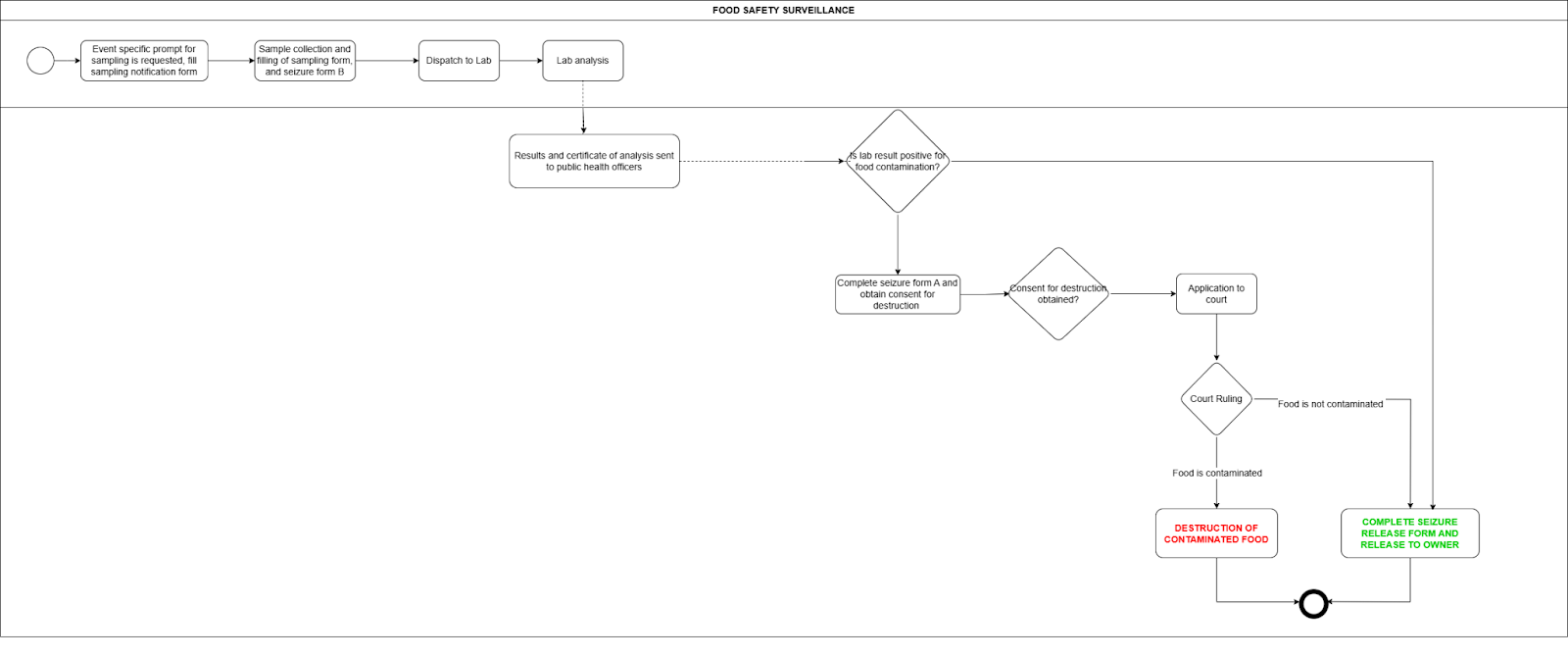
Objective: To routinely monitor for hazards in food, and inform the National MOH Division of any contaminated products detected in the market.
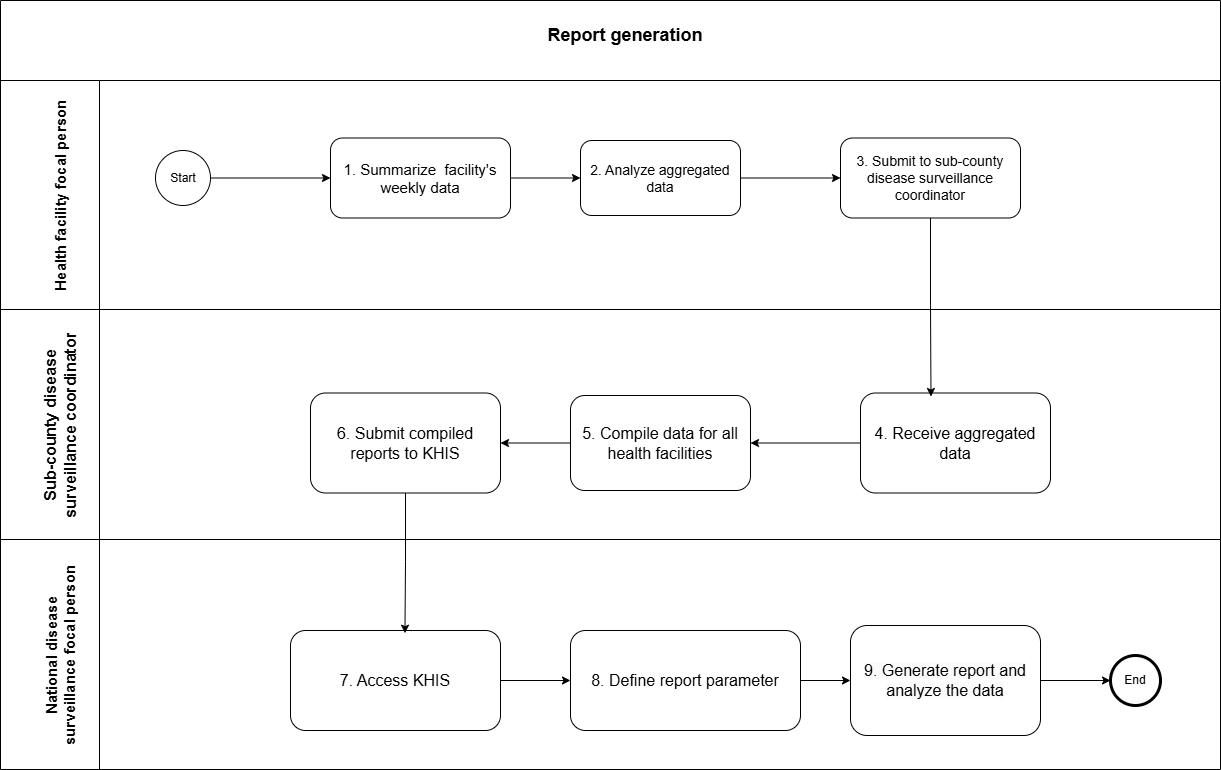
Objective: To aggregate client-level data into validated, aggregate reports, use the data, and submit reports
General Notes
Digital, case-based surveillance systems have several advantages compared with the more traditional paper-based aggregated systems, such as reductions in the recording and reporting workload of frontline workers, better data quality, faster access to data at all levels, more flexible data analysis and enhanced use of data through record linkage between databases. For this reason, WHO encourages countries to make the transition from paper-based aggregated to case-based digital surveillance.
Were data quality issues found?