


Global Core Electronic Medicinal Product Information (ePI)
1.1.0 - trial-use
World
Global Core Electronic Medicinal Product Information (ePI)
1.1.0 - trial-use
World
Global Core Electronic Medicinal Product Information (ePI), published by HL7 International / Biomedical Research and Regulation. This guide is not an authorized publication; it is the continuous build for version 1.1.0 built by the FHIR (HL7® FHIR® Standard) CI Build. This version is based on the current content of https://github.com/HL7/emedicinal-product-info/ and changes regularly. See the Directory of published versions
| Page standards status: Informative |
A structured approach to versioning, auditing, and traceability for ePI documents — from initial draft through regulatory approval, variation, and eventual withdrawal.
A UUID that uniquely identifies the Bundle instance on the server. Not persistent across servers — will change if the ePI is copied or migrated.
A version counter (1, 2, 3…) incremented automatically by the server with each update to this Bundle.
A UUID that stays constant across all versions of an ePI. Assigned by the authoring tool. Survives server migrations — used to group all versions of one ePI together.
A new UUID is generated for each document version to uniquely distinguish it. The version number (1, 2, 3…) is also incremented by the authoring tool.
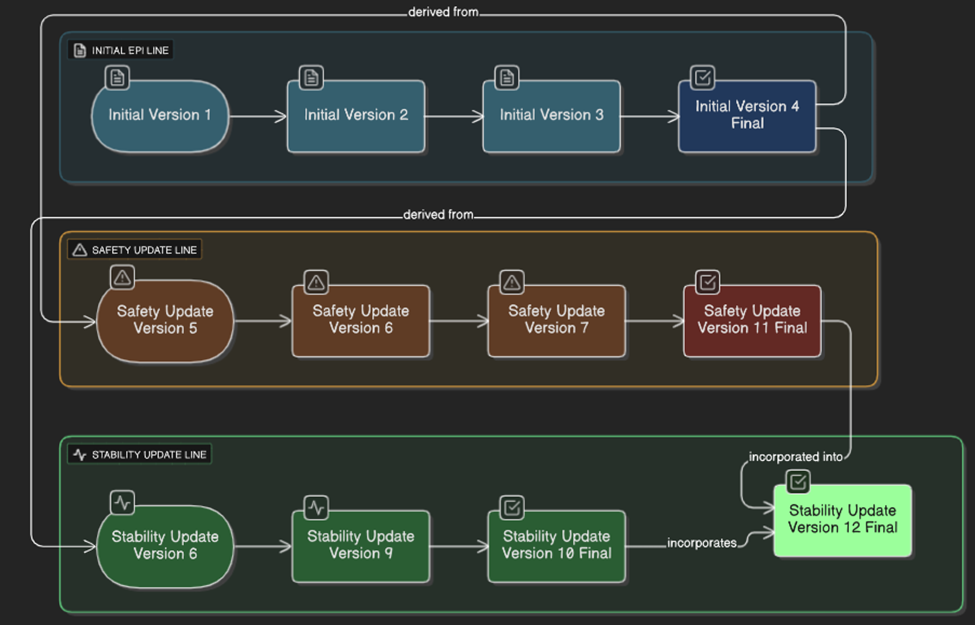
The arrows indicate the normal approval flow. The vertical bar separates terminal error states that can occur from any point in the lifecycle.
| Value | When to Use |
|---|---|
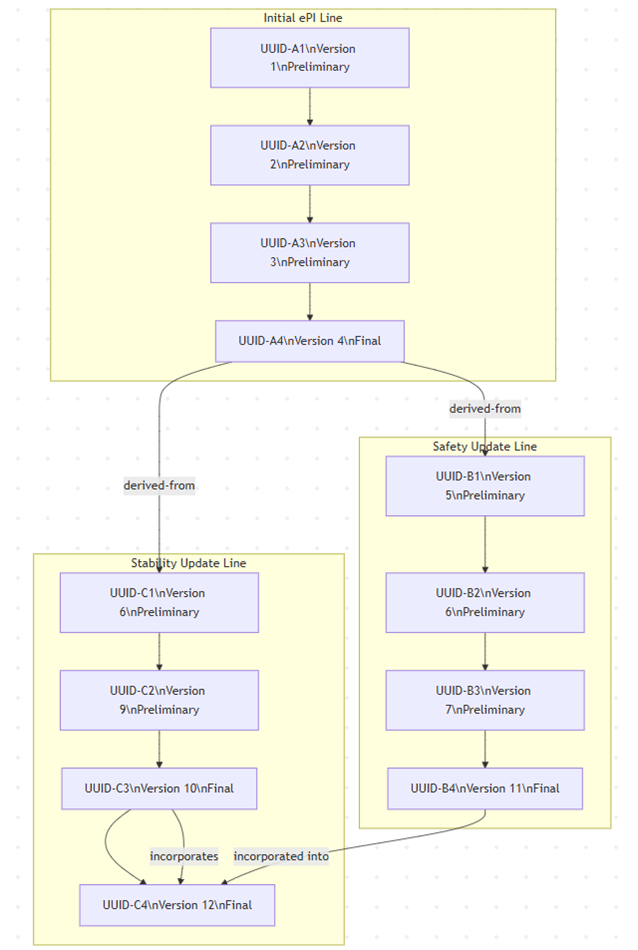
| derived-from | Creating a new draft by copying content from an existing final ePI (e.g., starting a variation or safety update). |
| amends | A new approved ePI modifies or adds content to a previous approved ePI — used in merge scenarios where parallel variations are consolidated. |
| replaces | A newer version (draft or final) completely supersedes an earlier version within the same ePI lineage. |
| retracts | Formally withdraws or invalidates a previous version — used with status = deprecated or entered-in-error. |
Bundle.id and meta.versionId = "1"Bundle.identifier stays the same as previous versionsComposition.identifier and incremented .versionComposition.relatesTo references the prior versionBundle.meta.versionId and updates meta.lastUpdatedBundle.identifier remains unchangedComposition.identifier and .version generated if this constitutes a new document versionBundle.identifier and Composition.identifier allow tracking across systemsComposition.relatesTo builds a version history chain| # | ePI Document | Action | Bundle.identifier | Comp.identifier | Ver | Status | relatesTo |
|---|---|---|---|---|---|---|---|
| 1 | Initial ePI | Company creates initial draft | UUID-1 | UUID-A1 | 1 | preliminary | — |
| 2 | Initial ePI | Company updates draft | UUID-1 | UUID-A2 | 2 | preliminary | replaces UUID-A1 |
| 3 | Initial ePI | Company updates draft | UUID-1 | UUID-A3 | 3 | preliminary | replaces UUID-A2 |
| 4 | Initial ePI | Regulator approves ePI | UUID-1 | UUID-A4 | 4 | final | replaces UUID-A3 |
| 5 | Safety Update ePI | Company creates draft from approved ePI | UUID-1 | UUID-B1 | 5 | preliminary | derived-from UUID-A4 |
| 6 | Stability Update ePI | Company creates draft from approved ePI | UUID-1 | UUID-C1 | 6 | preliminary | derived-from UUID-A4 |
| 10 | Stability Update ePI | Regulator approves ePI | UUID-1 | UUID-C3 | 10 | final | replaces UUID-C2 |
| 11 | Safety Update ePI | Regulator approves ePI | UUID-1 | UUID-B4 | 11 | final | replaces UUID-B3 |
| 12 | Stability Update ePI | Merge content from approved safety update | UUID-1 | UUID-C4 | 12 | final | amends UUID-C3 derived-from UUID-B4 |
Rows 7–9 (intermediate draft updates) are omitted for brevity.
IG © 2022+ HL7 International / Biomedical Research and Regulation.
Package hl7.fhir.uv.emedicinal-product-info#1.1.0 based on FHIR 5.0.0.
Generated
2026-07-01
Links: Table of Contents |
QA Report
| Version History |
 |
Propose a change
|
Propose a change