


Clinical Practice Guidelines
2.0.0 - STU2

Clinical Practice Guidelines
2.0.0 - STU2
Clinical Practice Guidelines, published by HL7 International / Clinical Decision Support. This guide is not an authorized publication; it is the continuous build for version 2.0.0 built by the FHIR (HL7® FHIR® Standard) CI Build. This version is based on the current content of https://github.com/HL7/cqf-recommendations/ and changes regularly. See the Directory of published versions
In many cases, the data required to assess applicability logic within clinical practice guidelines may be missing or incomplete. In Interactive Clinical Decision Support (CDS), the $questionnaire operation is used with PlanDefinition $apply and existing Structured Data Capture (SDC) operations to:
Familiarity with the $apply operation, CPG Case Feature Definition, and SDC form population and extraction are pre-requisites to understanding this process.
Questionnaire generation, population, and extraction is enabled for CPG Apply based on the presence of case feature definition as action.input. The plan definition is processed as follows:
When calling planDefinition/$apply, if the plan includes action.input where the profile is a case feature definition (StructureDefinition), choose the questionnaire generation approach based on the desired behavior: use planDefinition/$questionnaire to generate a single non-adaptive Questionnaire (including case features across nested plan definitions), or call structureDefinition/$questionnaire for relevant case feature definitions to support an adaptive process.
Build a pre-populated QuestionnaireResponse containing the Questionnaire from Step 1 by calling questionnaire/$populate using SDC expression based population.
Render the QuestionnaireResponse to the user and pause for user input to either
Change the QuestionnaireResponse and proceed to Steps 4 and 5; Or
Select recommendations from the RequestGroup and end the apply cycle.
If the QuestionnaireResponse is updated, call QuestionnaireResponse/$extract using SDC definition based extraction to create new resources based on QuestionnaireResponse from Step 3.
If there are new resources from Step 4, pass to the context and call PlanDefinition/$apply. The cycle repeats.
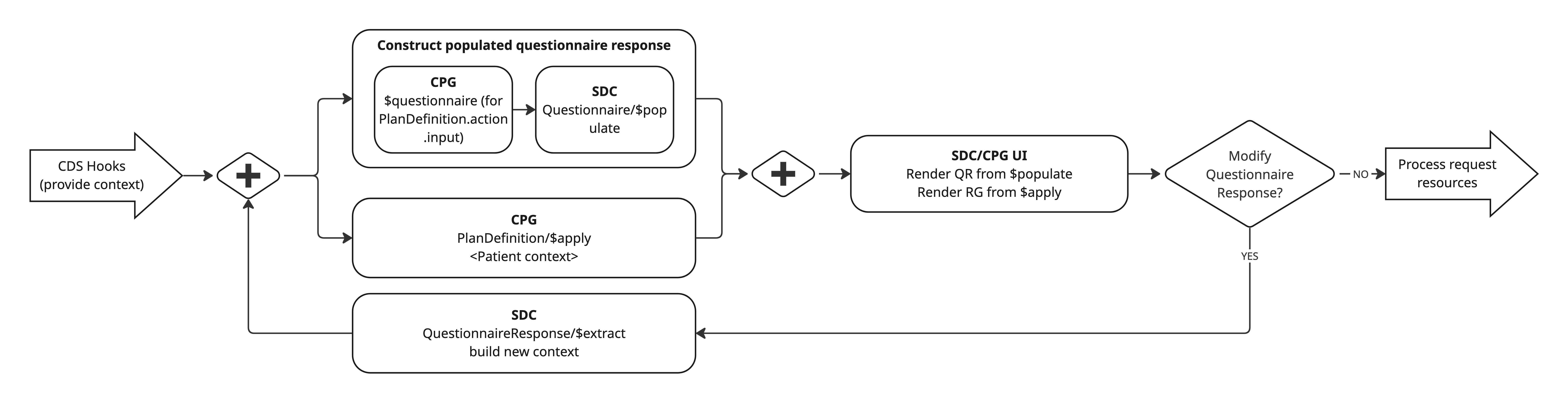
As outlined, the apply with questionnaire cycle is intended to repeat anytime new data is extracted from a QuestionnaireResponse. As new data is obtained, new questions may be displayed depending on applicable branches (as PlanDefinition.action) of the pathway.
Two questionnaire generation patterns are possible:
PlanDefinition/$questionnaire (non-adaptive): A full questionnaire can be generated from all referenced case feature definitions, including those in nested plan definitions. This is useful when collecting a comprehensive data set up front.
StructureDefinition/$questionnaire during apply (adaptive): As PlanDefinition/$apply evaluates logic and determines relevant branches, call StructureDefinition/$questionnaire for the currently relevant case feature definition(s). This returns only questions relevant to the current state and supports a truly adaptive process. \n\nConceptually this is similar to the SDC Adaptive Forms $next-question operation, where questions are dynamic based on prior user input. In Interactive CDS, PlanDefinition/$apply drives that adaptivity by determining which structure definitions should be used to generate the next set of questions.
When using extracted resources, it is important to consider conformance to case feature profiles defined on the plan definition. It is possible for the resource to be invalid but generate a result if the minimum data required for evaluation is present. The CQF message extension may be used to surface conformance errors or errors related to questionnaire items. Warnings do not imply operation failure.
Warnings may indicate:
The $questionnaire operation is used to generate a questionnaire when running $apply. Questionnaire can be called on StructureDefinition or PlanDefinition.
See CPG $questionnaire operation. The core operation is extended in CPG to support the parameter "minimalOnly". If true, elements from the structure definition should be processed if:
In this way, minimal only mode restricts questionnaire item generation to only those relevant to form data extraction.
| Element Definition | Questionnaire Item | notes |
|---|---|---|
| SDC definitionExtractValue Extension | sets SDC definitionExtractValue Extension on parent group item | see Conformance with expression based population and definition based extraction |
| CPG featureExpression Extension | sets SDC initialExpression Extension | see Conformance with expression based population and definition based extraction |
| defaultValue[x] | initial[x] | |
| {structureDefinition.url}#{element.path} | definition | for choice type paths, replace [x] with element type.code[0]; for sliced elements, append :{sliceName} |
| short description; element label; or stringified path | text | |
| type | type | see ElementDefinition Mappings |
| min > 0 | required | |
| max > 1 | repeats | |
| maxLength | maxLength | apply if type = string |
| binding.valueSet | expanded valueSet sets answerOption; set type as 'choice' | |
| ?? | readOnly |
Process elements from the structure definition resource. For each element to process:
If the element includes the SDC definition extract value extension, it is not necessary to create a questionnaire item. Instead, carry the extension over to the root item with type 'group'. See details on populate and extract conformance below.
Otherwise, process a new child item as follows
Questionnaire.extension[sdc-questionnaire-initialExpression] → StructureDefinition.extension[featureExpression]. See details on populate and extract conformance below.
Questionnaire.initial[x] → ElementDefinition.defaultValue[x]
QuestionnaireItem.linkId → generate some unique id
QuestionnaireItem.definition → {StructureDefinition.url}#{full element path}, where:
[x] replaced with type.code for choice types (e.g. 'Observation.effectiveDateTime')QuestionnaireItem.code → Not used
QuestionnaireItem.prefix → Not used
QuestionnaireItem.text in order of preference →
QuestionnaireItem.type (should always be a primitive type) →
QuestionnaireItem.required → if element.min > 0
QuestionnaireItem.repeats → if element.max > 1
QuestionnaireItem.maxLength → element.maxLength (if type is a string)
QuestionnaireItem.answerOption → expanded value set binding
See SDC expression based population and SDC definition based extraction
To support pre-population and data extraction:
At the root of the questionnaire, include extension questionnaire-launchContext for the in context subject (most often Patient), encounter, etc.
At the root item with type 'group'
Include the SDC definition extract extension. Set extension[definition].valueCanonical to the canonical of the SD.
Carry over any SDC definition extract value extensions from elements in the structure definition.
If CPG featureExpression is present on the SD
Add the SDC item population context extension set to the CPG featureExpression;
For each child item, include the SDC initialExpression extension and set the expression to the appropriate path from the population context.
Allowed data types between element definition and questionnaire items differ where element definition allows for complex data types and questionnaire item is restricted to primitive types, Quantity, Reference, Attachment, and Coding. The data types can be mapped between StructureDefinition and Questionnaire as outlined in the table below.
| FHIR Primitive Data Type | Questionnaire.item.type Code | QuestionnaireResponse.item.answerValue[x] Data Type | Notes |
|---|---|---|---|
| base64Binary | string | string | |
| boolean | boolean | boolean | |
| canonical | url | uri | |
| code | choice | coding | During $extract, this needs to map back from coding to code |
| date | date | date | |
| dateTime | dateTime | dateTime | |
| decimal | decimal | decimal | |
| id | string | string | |
| instant | dateTime | dateTime | |
| integer | integer | integer | |
| markdown | string | string | |
| oid | url | uri | |
| positiveInt | integer | integer | |
| string | string | string | |
| time | time | time | |
| unsignedInt | integer | integer | |
| uri | url | uri | |
| url | url | uri | |
| uuid | url | uri |
| Other Data Types | QuestionnaireItem.type Code | QuestionnaireResponse.item.answerValue[x] Data Type | Notes |
|---|---|---|---|
| coding | choice | coding | |
| codeableConcept | subgroup with items of type choice (coding) and string (text) | initialValueCoding; and/or initialValueString (to represent text) |
|
| quantity | quantity | quantity | Extension https://hl7.org/fhir/extensions/StructureDefinition-questionnaire-unit.html can be used to capture specific unit |
| reference | reference | reference | |
| attachment | attachment | attachment |
For non-primitive, complex data types, $questionnaire should be applied to the SD of the data type and returned as a subgroup of questionnaire items. An example of the Range data type represented as a group of questionnaire items follows.
{
  "linkId": "Range",
  "definition": "http://example.org/StructureDefinition/ExampleObservation#Observation.value[x]:valueRange",
  "text": "Actual result",
  "type": "group",
  "item": [
    {
      "linkId": "Range.low",
      "definition": "http://example.org/StructureDefinition/ExampleObservation#Observation.value[x]:valueRange.low",
      "text": "Low limit",
      "type": "quantity"
    },
    {
      "linkId": "Range.high",
      "definition": "http://example.org/StructureDefinition/ExampleObservation#Observation.value[x]:valueRange.high",
      "text": "High limit",
      "type": "quantity"
    }
  ]
}
See CPG plan definition $questionnaire operation.
PlanDefinition/$questionnaire uses the same principles and methodology as StructureDefinition/$questionnaire, but is generated from multiple StructureDefinitions. These are case feature definitions referenced from PlanDefinition action.input.
The PlanDefinition is processed as follows:
Find all planDefinition.action.input elements where a case feature is referenced. If the plan definition includes action.definitionCanonical with a reference to another plan definition, recurse over the nested planDefinition.action.input elements.
Using the processing semantics for structureDefinition/$questionnaire, for each case feature identified from the PlanDefinition:
Generate a group of questionnaire items on the target questionnaire; or
To leverage Questionnaire/$assemble, generate an individual questionnaire for each case feature. Then call $assemble to generate a single questionnaire. See SDC modular questionnaires for implementation details.
The questionnaire should conform to SDC Populatable Questionnaire - Expression and SDC Extractable Questionnaire - Definition and should align with the expected output of Questionnaire/$assemble, although the assembly process may differ.
IG © 2023+ HL7 International / Clinical Decision Support.
Package hl7.fhir.uv.cpg#2.0.0 based on FHIR 4.0.1.
Generated
2026-06-10
Links: Table of Contents |
QA Report
| Version History |
 |
Propose a change
|
Propose a change